Colours and backgrounds · 색상과 배경
This page needs a recent browser (with SharedArrayBuffer support). Please update Chrome, Edge, Firefox or Safari to the latest version. · 이 페이지는 최신 브라우저(SharedArrayBuffer 지원)가 필요합니다. Chrome, Edge, Firefox 또는 Safari를 최신 버전으로 업데이트해 주세요.
English
Colours
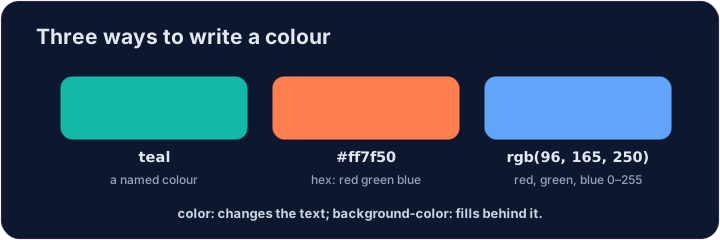
- You can name a colour:
red,blue,green,tomato,gold, and many more. - Or use a hex code like
#2a7ae2— a#followed by six letters/numbers. - Names are easy to remember; hex codes give you millions of exact colours.
한국어
색상
- 색상에 이름을 붙일 수 있습니다:
red,blue,green,tomato,gold등 매우 많습니다. - 또는
#2a7ae2같은 헥스 코드를 사용할 수 있습니다 — 이는#뒤에 여섯 글자/숫자가 따라오는 형태입니다. - 이름은 기억하기 쉬우며, 헥스 코드는数百万 가지 정확한 색상을 제공합니다.
English
Backgrounds
colorchanges the text colour.background-colorchanges the colour behind an element.- Put
background-coloronbodyto colour the whole page.
한국어
배경
color는 텍스트 색상을 변경합니다.background-color는 요소 뒤쪽 배경의 색상을 변경합니다.- 전체 페이지에 색상을 입히려면
background-color를body에 적용하세요.
<style>
  body { background-color: #f3f4f6; }
  h1   { color: tomato; }
</style>
<h1>Hello!</h1>
<p>A page with a soft grey background.</p>
English
Common mistakes
colorsets the text;background-colorsets the background.- A colour is a name, a
#rrggbbcode, orrgb(...).
한국어
흔한 실수
color는 텍스트를 설정하고,background-color는 배경을 설정합니다.- 색상은 이름,
#rrggbb코드, 또는rgb(...)일 수 있습니다.
English
Now you try
coloris the text;background-coloris behind it.- Colour the page background, then use a hex colour on the heading.
한국어
이제 직접 해보기
color는 텍스트이며,background-color는 그 뒤의 배경입니다.- 페이지 배경색을 먼저 설정한 후, 제목에는 헥스 색상 값을 사용하세요.
Give the whole page a soft background. Add body { background-color: lightyellow; }. · 전체 페이지에 부드러운 배경을 부여하십시오. body { background-color: lightyellow; }를 추가하십시오.
Colour the heading with a hex code. Add h1 { color: #2a7ae2; } (that's a blue). · 헤더를 hex 코드로 색칠하십시오. h1 { color: #2a7ae2; }를 추가하십시오(이는 파란색입니다).