Headings and paragraphs · 제목과 문단
This page needs a recent browser (with SharedArrayBuffer support). Please update Chrome, Edge, Firefox or Safari to the latest version. · 이 페이지는 최신 브라우저(SharedArrayBuffer 지원)가 필요합니다. Chrome, Edge, Firefox 또는 Safari를 최신 버전으로 업데이트해 주세요.
English
Headings
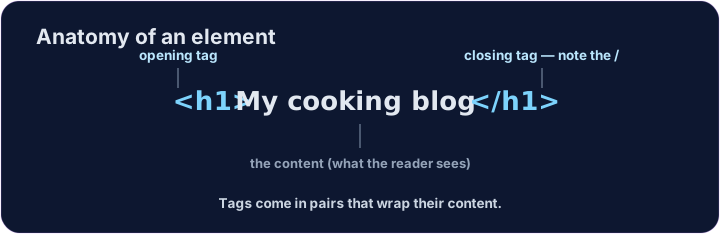
- A heading is a title on your page.
- Use
<h1>for the biggest, most important heading. - Like all HTML, it comes in a pair:
<h1>...</h1>.
한국어
제목
- **제목(heading)**은 페이지의 제목입니다.
- 가장 크고 중요한 제목에
<h1>를 사용하세요. - 모든 HTML과 마찬가지로 쌍으로 존재합니다:
<h1>...</h1>.
<h1>My cooking blog</h1>
<p>Welcome! Here are my favourite recipes.</p>
English
Six sizes
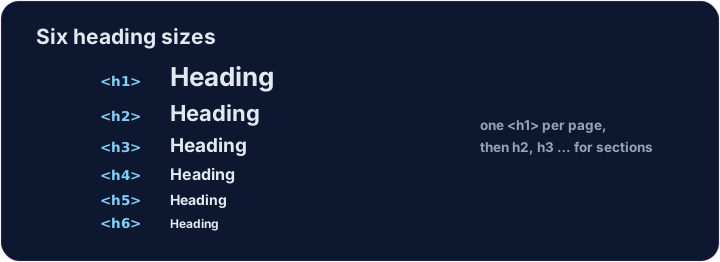
- There are six headings, from
<h1>down to<h6>. <h1>is the largest;<h6>is the smallest.- Use one
<h1>for the page's main title, then smaller ones for sections.
한국어
여섯 가지 크기
<h1>부터<h6>까지 총 여섯 가지 제목이 있습니다.<h1>가 가장 크고,<h6>이 가장 작습니다.- 페이지의 주요 제목에는 하나의
<h1>를 사용하고, 섹션에는 더 작은 것들을 사용하세요.
<h1>Biggest</h1>
<h2>Smaller</h2>
<h3>Smaller still</h3>
English
Common mistakes
- Headings run
<h1>(biggest) to<h6>— do not pick one just for its size. - A paragraph is
<p>...</p>.
한국어
흔한 실수
- 제목은
<h1>(가장 큼)부터<h6>까지 순서대로 배정되므로, 단순히 크기만 보고 고르지 마세요. - 문단 paragraph는
<p>...</p>입니다.
English
Now you try
- A page is just headings and paragraphs stacked together.
- Build the two little tasks below.
한국어
이제 직접 해보기
- 페이지는 제목과 문단이 쌓여 이루어집니다.
- 아래 두 작은 작업을 만들어 보세요.
Add a big heading that says My Blog. Use an <h1> … </h1> pair. · My Blog이라고 말하는 큰 제목을 추가하십시오. <h1> … </h1> 쌍을 사용하십시오.
Make a heading About me, and under it a paragraph that says I love coding. · About me라는 제목을 만들고, 그 아래에 **I love coding.**라고 말하는 문단을 만들십시오.