Pipes — joining commands
This page needs a recent browser (with SharedArrayBuffer support). Please update Chrome, Edge, Firefox or Safari to the latest version. · 이 페이지는 최신 브라우저(SharedArrayBuffer 지원)가 필요합니다. Chrome, Edge, Firefox 또는 Safari를 최신 버전으로 업데이트해 주세요.
English
The big idea: pipes
- This is what makes the shell powerful. A pipe
|sends one command's output straight into the next command:
catproduces the lines;sortreceives them and puts them in order. No file in between.
한국어
핵심 개념: 파이프
- 이것이 쉘을 강력하게 만드는 이유입니다. 파이프
|는 한 명령어의 출력을 다음 명령어로 직접 전달합니다:
cat fruits.txt | sort
cat가 줄을 생성하고,sort이 받아서 순서를 정합니다. 중간에 파일이 없습니다.
English
Build a chain
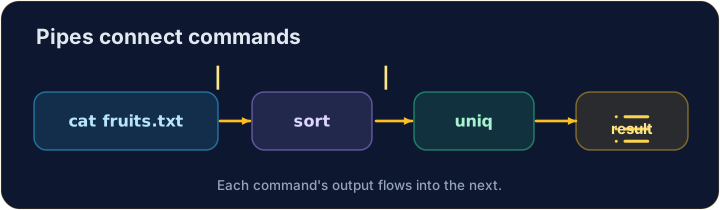
- You can join as many as you like, like an assembly line:
sortorders the lines, thenuniqremoves neighbouring duplicates — so you get each fruit once.
한국어
체인 만들기
- 어스sembly 라인처럼 원하는 만큼 연결할 수 있습니다:
cat fruits.txt | sort | uniq
sort가 줄을 정렬하고,uniq이 인접한 중복을 제거하므로 각 과일이 한 번만 나타납니다.
English
Small tools, big results
- Each command does one job well. Pipes let you combine them to answer real questions:
- "How many different fruits are there?" — sort, dedupe, then count. That is the Unix way.
한국어
작은 도구, 큰 결과
- 각 명령어는 하나의 일을 잘 수행합니다. 파이프를 통해 조합하면 실제 질문에 답할 수 있습니다:
cat fruits.txt | sort | uniq | wc -l
- "다양한 과일은 몇 가지인가?" — 정렬, 중복 제거, 그리고 세기. 이것이 유닉스의 방식입니다.
English
Common mistakes
|sends one command's output into the next.- Order matters:
sort | uniq, not the other way round.
한국어
흔한 실수
|는 한 명령어의 출력을 다음으로 보냅니다.- 순서가 중요합니다:
sort | uniq가 맞으며, 반대로 하면 안 됩니다.
Explore · 탐색하기
Pipes join commands
A pipe feeds one command's output into the next's input.
Send the output of cat fruits.txt into wc -l with a pipe |, to count the lines.
List each fruit once, in order. Pipe sort into uniq: cat fruits.txt | sort | uniq.