Tables · 표
This page needs a recent browser (with SharedArrayBuffer support). Please update Chrome, Edge, Firefox or Safari to the latest version. · 이 페이지는 최신 브라우저(SharedArrayBuffer 지원)가 필요합니다. Chrome, Edge, Firefox 또는 Safari를 최신 버전으로 업데이트해 주세요.
English
Tables
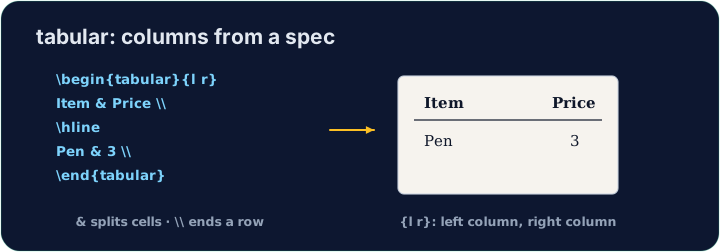
- A table uses the
tabularenvironment. You first describe the columns:
{l c r}means three columns: left-aligned, centred, right-aligned.
한국어
표
- 표는
tabular환경을 사용합니다. 먼저 열을 설명해야 합니다:
\begin{tabular}{l c r}
  left & centre & right \\
\end{tabular}
{l c r}는 세 개의 열을 의미합니다: left-정렬, central-정렬, right-정렬.
English
Rows and cells
- Inside,
&jumps to the next column and\\starts a new row:
- The number of cells in each row must match the number of columns you declared.
한국어
줄과 셀
- 내부에서
&는 다음 열로 이동하고\\는 새로운 줄을 시작합니다:
\begin{tabular}{l l}
  Apple & 5 \\
  Banana & 3 \\
\end{tabular}
- 각 줄의 셀 수는 선언한 열 수와 일치해야 합니다.
English
Lines (optional)
- Add
|between column letters for vertical lines, and\hlinefor horizontal ones:
- For a cleaner look, professionals use the
booktabspackage instead of many lines.
한국어
선(선택 사항)
- 수직선을 추가하려면 열 문자 사이에
|를, 수평선에는\hline를 넣으세요:
\begin{tabular}{|l|l|}
  \hline
  Apple & 5 \\ \hline
\end{tabular}
- 더 깔끔한 시각적 효과를 위해 전문가들은 여러 선 대신
booktabs패키지를 사용합니다.
English
Common mistakes
tabularneeds a column spec like{lcr}; separate cells with&and end rows with\\.- The number of
&per row must fit the column spec.
한국어
흔한 실수
tabular는{lcr}와 같은 열 사양이 필요하며, 셀은&으로, 줄은\\으로 분리됩니다.- 각 줄의
&개수는 열 사양에 맞아야 합니다.
Build a small two-column table with \begin{tabular}{l l}. Separate the two cells in a row with &, and end each row with \\. Add the rows for Bob (30) and Mei (25). · \begin{tabular}{l l}로 작은 2열 표를 만드세요. 한 줄의 두 셀을 &로 나누고, 각 줄을 \\으로 마무리하세요. Bob(30)과 Mei(25)의 행을 추가하세요.
Click Run to compile and preview the PDF. · PDF를 컴파일하고 미리보기하려면 '실행'을 클릭하세요.
Add lines to the table. Put \hline at the top, after the header row, and at the bottom, and use |l|l| in the column spec for vertical lines. · 테이블에 줄을 추가하십시오. 헤더 행 다음, 표의 맨 아래에 \hline를 배치하고, 수직 선을 위해 열 명세서에 |l|l|을 사용하십시오.
Click Run to compile and preview the PDF. · PDF를 컴파일하고 미리보기하려면 '실행'을 클릭하세요.