Bold, italic and emphasis · 굵게, 이태릭 및 강조
This page needs a recent browser (with SharedArrayBuffer support). Please update Chrome, Edge, Firefox or Safari to the latest version. · 이 페이지는 최신 브라우저(SharedArrayBuffer 지원)가 필요합니다. Chrome, Edge, Firefox 또는 Safari를 최신 버전으로 업데이트해 주세요.
English
Styling words
- To change how words look, you wrap them in a command:
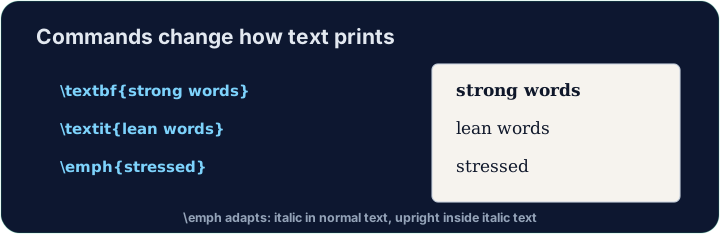
\textbf= bold,\textit= italic,\texttt=code-like.
한국어
글꼴 스타일링
- 글자의 외관을 바꾸려면 명령어로 감싸야 합니다:
\textbf{bold} and \textit{italic} and \texttt{typewriter}
\textbf= 굵게,\textit= 기울여,\texttt=code-like.
English
Emphasis the smart way
\emph{...}means "emphasise this" — usually italic, but it flips smartly inside italic text.- Prefer
\emphfor meaning, and\textitwhen you specifically want italic shapes.
한국어
스마트한 강조 방법
\emph{...}은 "이를 강조"라는 뜻입니다 — 일반적으로 기울여 쓰지만, 기울어진 텍스트 내에서 스마트하게 반대로 적용됩니다.- 의미 강조에는
\emph을 선호하고, 특정히 기울인 글꼴을 원할 때는\textit을 사용하세요.
English
A note on quotes and dashes
- Type opening quotes with two backticks and closing with two apostrophes:
- A dash in a range is
--(en-dash, like 10--20); a pause in a sentence is---(em-dash). - These little touches are what make LaTeX documents look professional.
한국어
인용부호와 대시(Dash)에 대한 참고
- 여는 인용부호는 백틱 두 개, 닫는 인용부호는 apostrophe 두 개를 사용합니다:
- 범위 내의 대시는
--(en-dash, 예: 10--20); 문장 내의 휴지연 대시는---(em-dash)입니다. - 이러한 작은 디테일이 LaTeX 문서를 전문적으로 보이게 만듭니다.
English
Common mistakes
\textbf{...}is bold,\textit{...}italic,\emph{...}emphasis.- Every opening brace
{needs a matching}.
한국어
흔한 실수
\textbf{...}은 굵게,\textit{...}은 기울여,\emph{...}은 강조입니다.- 모든 여는 괄호
{에는 대응하는}이 필요합니다.
Make the word important bold with \textbf{...}, and the word gently italic with \textit{...}. Then Run to see the styles. · \textbf{...}를 사용하여 중요한 단어를 굵게 하고, \textit{...}를 사용하여 부드럽게 단어를 이태릭으로 만드세요. 그런 다음 **Run(실행)**을 눌러 스타일을 확인하세요.
Click Run to compile and preview the PDF. · PDF를 컴파일하고 미리보기하려면 '실행'을 클릭하세요.
Use the right tool for the job. Mark really with \emph{...} (emphasis that flips smartly), and show the file name report.tex in \texttt{...} (typewriter font). · 작업에 맞는 도구를 사용하세요. 정말(really) 단어를 \emph{...}로 강조(스마트하게 변하는 강조 효과)하고, 파일명 report.tex를 \texttt{...}에 타이포라이터 폰트로 표시하세요.
Click Run to compile and preview the PDF. · PDF를 컴파일하고 미리보기하려면 '실행'을 클릭하세요.