Template literals
This page needs a recent browser (with SharedArrayBuffer support). Please update Chrome, Edge, Firefox or Safari to the latest version. · 이 페이지는 최신 브라우저(SharedArrayBuffer 지원)가 필요합니다. Chrome, Edge, Firefox 또는 Safari를 최신 버전으로 업데이트해 주세요.
English
A cleaner way to build strings
- Wrap a string in backticks
`and you can drop values straight in with${...}. - This is a template literal — much tidier than joining with lots of
+.
한국어
더 깔끔한 문자열 생성 방법
- 문자열을 백틱
`로 감싸면${...}을 사용하여 값을 직접 넣을 수 있습니다. - 이는 템플릿 리터럴로, 많은
+으로 연결하는 것보다 훨씬 깔끔합니다.
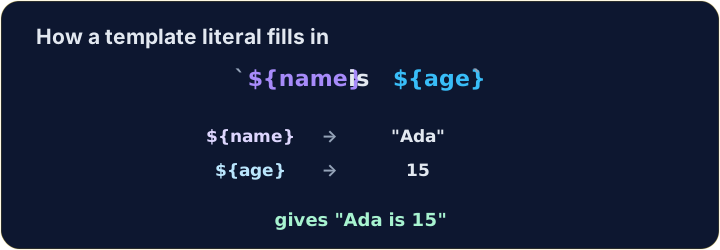
let name = "Ada";
let age = 15;
console.log(`${name} is ${age}`);   // → Ada is 15
English
Any expression fits inside ${ }
- Whatever you write inside
${...}is worked out first, then dropped into the string.
한국어
${ } 안에 어떤 표현이나도 넣을 수 있습니다
${...}안에 작성한 내용은 먼저 계산되고, 그 결과가 문자열에 삽입됩니다.
let a = 3;
let b = 4;
console.log(`${a} + ${b} = ${a + b}`);   // → 3 + 4 = 7
English
Same string, two ways
+and a template literal can build exactly the same text.- In backticks, spaces and punctuation stay where you type them, so a missing space is easy to see.
한국어
동일한 문자열, 두 가지 방식
+과 템플릿 리터럴은 정확히 같은 텍스트를 생성할 수 있습니다.- 백틱 내부에서는 공백 및 부호를 입력한 위치에 그대로 유지하므로, 누락된 공백을 쉽게 확인할 수 있습니다.
let item = "pen";
let price = 3;
console.log("A " + item + " costs " + price + " yuan.");   // → A pen costs 3 yuan.
console.log(`A ${item} costs ${price} yuan.`);             // → A pen costs 3 yuan.
English
Watch out
- Backticks
`are not the same as quotes'or".${...}only works inside backticks. - Bonus: a backtick string can span several lines — handy for longer messages.
한국어
주의사항
- 백틱
`은 따옴표'또는"과 다릅니다.${...}은 백틱 내부에서만 작동합니다. - 추가 기능: 백틱 문자열은 여러 줄에 걸쳐 확장될 수 있어 긴 메시지에 유용합니다.
English
Common mistakes
- Template literals use backticks and
${...}:`Hi ${name}`, not quotes. - Inside
${...}you can put any expression.
한국어
흔한 실수
- 템플릿 리터럴은 백틱과
${...}을 사용합니다:`Hi ${name}`이 아니라 따옴표입니다. ${...}내부에는 어떤 표현이나 넣을 수 있습니다.
English
Now you try
- Use backticks and
${...}. - Press Check answer to test it.
한국어
이제 직접 해보기
- 백틱과
${...}을 사용하세요. - 답안 확인을 눌러 테스트해 보십시오.
let name = "Sam". Use a template literal (backticks) to log Hello, Sam!.
Click Run to see the output here. · 출력을 보려면 '실행'을 클릭하세요.
a is 3 and b is 4. Use a template literal to log 3 + 4 = 7 (put a + b inside ${ }).
Click Run to see the output here. · 출력을 보려면 '실행'을 클릭하세요.
Use a template literal to log Total: 10, working out the 10 as 5 * 2 inside ${ }.
Click Run to see the output here. · 출력을 보려면 '실행'을 클릭하세요.