HTTPS, SSL/TLS and certificates · HTTPS, SSL/TLS 및 인증서
The padlock in your browser
- When you see HTTPS and a padlock, your connection to the website is encrypted.
- The "S" stands for Secure. It uses a protocol called TLS (the modern version of SSL).
브라우저의 자물쇠
- HTTPS와 자물쇠 아이콘을 보면, 웹사이트의 연결이 암호화되어 있음을 의미합니다.
- 'S'는 **Secure(안전)**을 뜻하며, TLS라는 프로토콜을 사용합니다(현대 버전의 SSL).
How the secure connection is set up
- TLS cleverly combines both kinds of encryption you have learned:
- It uses asymmetric encryption to safely agree on a shared secret key.
- Then it switches to fast symmetric encryption for the rest of the conversation.
- This "handshake" happens in a fraction of a second, before any page loads.
안전한 연결 설정 방법
- TLS는 배운 두 가지 종류의 암호화를巧妙地结合:
- 비대칭 암호화를 사용하여 공유SECRET密钥安全协商。
- 이후 대화의 나머지 부분은 빠른 대칭 암호화로 전환됩니다.
- 이 '握手'过程在页面加载前数分之一秒内完成。
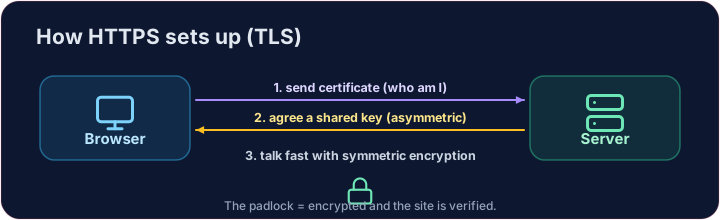
How do you know the site is real?
- Encryption is useless if you are talking to an impostor. That is what digital certificates solve.
- A website's certificate is issued by a trusted Certificate Authority (CA) and signed with the CA's key.
- Your browser checks the signature. If it is valid, you know the site is who it claims to be.
사이트가 진짜인지 어떻게 알까?
- 사기꾼과 대화 중이라면 암호화는 무용지물입니다. 이것이 디지털 인증서가 해결하는 문제입니다.
- 웹사이트의 인증서는 신뢰할 수 있는 **인증 기관(CA)**에서 발급되며, CA의 키로 서명됩니다.
- 브라우저가 서명을 확인합니다. 유효하다면 해당 사이트가自称身份属实。
Putting it together
- Certificate → proves who the site is. TLS → keeps the conversation secret.
- That tiny padlock means: encrypted, and verified. No padlock on a login page? Walk away.
Covers: IGCSE 5.3 (SSL), A-Level 17.1 (SSL/TLS, digital certificates).
통합하기
- 인증서 → 사이트의 정체성 증명. TLS → 대화의 비밀성 유지.
- 그 작은 자물쇠는 '암호화且在已验证'意味着什么?没有登录页面的锁?离开!
*内容:IGCSE 5.3 (SSL),A-Level 17.1 (SSL/TLS,数字证书)。
Now you try
- First put the four handshake steps in the right order — the exam loves this sequence.
- Then be the browser: look at a certificate's details and decide whether to trust it.
이제 직접 해보기
- 먼저握手四步按正确顺序排列——考试喜欢这个序列。
- 이제 브라우저가 되어: 인증서의 세부 사항을 확인하고 신뢰할지 결정하십시오.
Common mistakes
- HTTPS encrypts the traffic; the certificate proves the site's identity.
- A certificate warning is a real warning — do not click through it.
흔한 실수
- HTTPS는 트래픽을 암호화하며, 인증서는 사이트의 신원을 증명합니다.
- 인증서 경고는 실제 경고이므로, 이를 무시하고 넘어가지 마십시오.
The TLS handshake · TLS 핸드셰이크
HTTPS sets up a secure channel before any data is sent. · HTTPS는 데이터가 송신되기 전에 안전한 채널을 설정합니다.
Put the TLS handshake in order. Fill the list order with the four steps, first to last: hello, certificate, key exchange, secure data. · TLS 핸드셰이크 단계를 정리하세요.列表 order에 4단계를 첫 번째부터 마지막까지 채우세요: hello, certificate, key exchange, secure data.
Click Run to see the output here. · 출력을 보려면 '실행'을 클릭하세요.
Be the browser. Trust the certificate only if the name matches the site you asked for, the issuer is trusted, AND it has not expired (expires ≥ 2026). Print valid or invalid. · 브라우저 역할을 하십시오. name이 요청한 site과 일치하고, 발행자가 신뢰할 수 있으며, 만기가 지나지 않았을 때만(expires ≥ 2026) 인증서를 신뢰하십시오. valid 또는 invalid를 출력하십시오.
Click Run to see the output here. · 출력을 보려면 '실행'을 클릭하세요.