Storing passwords safely · 비밀번호 안전하게 저장하기
The big rule: never store plain passwords
- If a website stores your password as plain text and gets hacked, every password is stolen instantly.
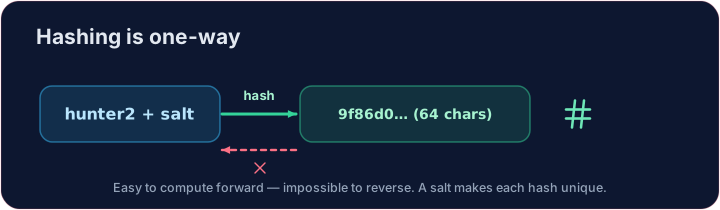
- Instead, sites store a hash — a scrambled fingerprint that cannot be reversed back into the password.
What is a hash?
- A hash function turns any input into a fixed-length string. The same input always gives the same hash.
- It is one-way: easy to compute forwards, practically impossible to reverse.
- When you log in, the site hashes what you typed and compares it to the stored hash — it only ever stores the hash, never your actual password.
import hashlib
print(hashlib.sha256(b"hello").hexdigest())
Add salt
- If two users pick the same password, their hashes match — a clue for attackers.
- A salt is a random string added before hashing, so identical passwords get different hashes.
- It also defeats pre-computed "rainbow table" attacks. Always salt.
Your turn
- Hash
salt + passwordwith SHA-256. The check confirms you produced the correct 64-character digest.
Covers: A-Level 6.1, 17.1 (encryption/hashing).
Common mistakes
- Never store passwords in plain text.
- Store a salted hash, not the password itself.
Store the hash, not the password · 비밀번호 대신 해시를 저장하십시오
Sites store a hash; a tiny change gives a totally different digest. · 사이트들은 해시를 저장합니다; 약간의 변화는 완전히 다른 디제스트를 생성합니다.
Never store a plain password — store its hash. Using hashlib, hash the salt + password with SHA-256 and put the hex digest in a variable called digest. · 평문 비밀번호를 절대 저장하지 말고 해시(hash) 를 저장하십시오. hashlib을 사용하여 SHA-256로 소금(salt) + 비밀번호를 해시하여 hex.digest를 digest라는 변수에 저장하십시오.
Click Run to see the output here. · 출력을 보려면 '실행'을 클릭하세요.
Now be the login system. The database holds a salt and a stored digest — never the password. Hash salt + attempt with SHA-256 and print welcome if it matches stored, else denied. · 이제 로그인 시스템 역할을 하십시오. 데이터베이스에는 salt과 stored 디지스트만 저장되어 있으며 비밀번호는 없습니다. salt + attempt을 SHA-256로 해시하여, 그것이 welcome과 일치할 경우 stored을 출력하고, 그렇지 않으면 denied을 출력하십시오.
Click Run to see the output here. · 출력을 보려면 '실행'을 클릭하세요.