Writing a class: fields, constructor, methods · 클래스 작성: 필드, 컨스트럭터, 메소드
Make your own type
- So far you used classes like
StringandMaththat Java gave you. - Now you will write your own class. A class is a plan for an object.
- An object holds data (its own values) and methods (things it can do).
사용자 정의 타입 만들기
- 지금까지
String나Math과 같은 Java가 제공해 준 클래스를 사용했습니다. - 이제 직접 클래스를 작성하게 됩니다. 클래스는 객체를 위한 설계도입니다.
- 객체는 데이터(자신의 값)와 메소드(수행 가능한 기능)를 보유합니다.
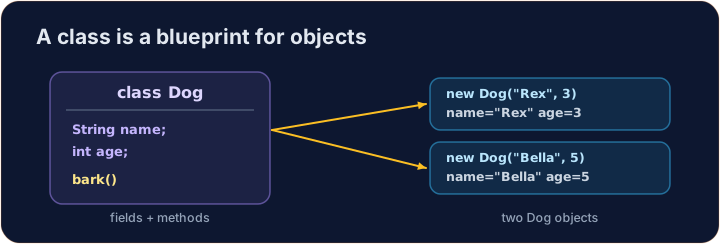
Instance variables
- Data that each object keeps is stored in instance variables (also called fields).
- You declare them inside the class, but outside any method.
- Each object gets its own copy of these variables.
인스턴스 변수
- 각 객체가 보유하는 데이터는 인스턴스 변수(또는 필드)에 저장됩니다.
- 이들을 클래스 내부에서 정의하지만, 어떤 메서드 밖에서 정의합니다.
- 각 객체는 이 변수들의 고유한 복사본을 가집니다.
public class Dog {
    String name;   // instance variable
    int age;       // instance variable
}
A constructor
- A constructor sets up a new object. It runs when you write
new. - It has the same name as the class and no return type (not even
void). - Use the word
thisto mean "this object's own variable".
컨스트럭터
- 컨스트럭터는 새로운 객체를 설정합니다.
new를 작성할 때 실행됩니다. - It has the same name as the class and no return type (not even
void). - "이 객체의 고유한 변수"를 의미하는 데
this단어를 사용합니다.
public class Dog {
    String name;
    int age;

    // Constructor: runs when we make a new Dog
    public Dog(String name, int age) {
        this.name = name;   // this.name is the field; name is the parameter
        this.age = age;
    }
}
Instance methods
- An instance method is an action an object can do.
- It can read and change the object's own instance variables.
- You call it on an object with a dot:
myDog.speak().
인스턴스 메서드
- 인스턴스 메서드는 객체가 수행할 수 있는 작업입니다.
- 이 객체의 인스턴스 변수를 읽거나 변경할 수 있습니다.
- 도트(.)를 사용하여 객체 위에서 호출합니다:
myDog.speak().
public class Dog {
    String name;
    int age;

    public Dog(String name, int age) {
        this.name = name;
        this.age = age;
    }

    // Instance method: returns a sentence about this dog
    public String describe() {
        return this.name + " is " + this.age;
    }
}
Make and use an object
- Use
new ClassName(...)to build an object. This calls the constructor. - Store it in a variable whose type is the class name.
- Then call its methods with a dot.
객체 생성 및 사용법
- 객체를 생성하려면
new ClassName(...)를 사용합니다. 이는 컨스트럭터를 호출합니다. - 클래스명을 타입으로 하는 변수에 저장합니다.
- 그 후 도트(.)를 사용하여 메서드를 호출합니다.
public class Main {
    public static void main(String[] args) {
        Dog d = new Dog("Rex", 4);
        System.out.println(d.describe());   // Rex is 4
    }
}

class Dog {
    String name;
    int age;

    public Dog(String name, int age) {
        this.name = name;
        this.age = age;
    }

    public String describe() {
        return this.name + " is " + this.age;
    }
}
Why this?
- A parameter and a field can have the same name (like
name). - Inside the constructor,
namemeans the parameter;this.namemeans the field. thisalways means the object the method was called on.
왜 this가 필요할까요?
- 매개변수와 필드는 같은 이름을 가질 수 있습니다(예:
name). - 컨스트럭터 내부에서
name는 매개변수를,this.name는 필드를 의미합니다. this는 항상 메서드가 호출된 객체를 의미합니다.
Common mistakes
- A constructor has no return type and matches the class name.
- Use
this.fieldto tell a field from a parameter of the same name.
흔한 실수
- 컨스트럭터는 반환 타입이 없으며 클래스명과 동일한 이름을 가집니다.
- 같은 이름의 필드와 매개변구를 구분하기 위해
this.field를 사용합니다.
Now you try
- Each task gives you a class skeleton with a TODO. Fill it in so it compiles and works.
- A hidden Harness builds your object and checks the results.
- Press Run to compile, then Check answer.
이제 직접 해보기
- 각 과제는 TODO가 포함된 클래스 스택골트를 제공합니다. 컴파일되어 작동하도록 채우세요.
- 숨겨진 Harness가 객체를 생성하고 결과를 확인합니다.
- 컴파일하려면 Run을 누르고, 그 후 Check answer를 누르십시오.
Complete the Counter class. It has an int field count that starts at 0. increment() adds 1 to it. getCount() returns the current value. · Counter 클래스를 완성하세요. int 필드 count가 0으로 시작합니다. increment()는 이 값에 1을 더합니다. getCount()는 현재 값을 반환합니다.
Click Run to see the output here. · 출력을 보려면 '실행'을 클릭하세요.
Complete the Rectangle class. The constructor takes width w and height h and stores them. area() returns width times height. perimeter() returns 2 times (width plus height). · Rectangle 클래스를 완성하세요. 컨스트럭터는 너비 w와 높이 h를 받아 저장합니다. area()는 너비에 높이를 곱한 결과를 반환합니다. perimeter()는 (너비 + 높이)의 2배를 반환합니다.
Click Run to see the output here. · 출력을 보려면 '실행'을 클릭하세요.
Complete the Greeter class. The constructor takes a String name and stores it in the field name. greet() returns the text Hello, followed by the name and a ! (for "Ana" it returns Hello, Ana!). · Greeter 클래스를 완성하세요. 컨스트럭터는 String name를 받아 필드 name에 저장합니다. greet()는 텍스트 Hello, 뒤에 이름과 !를 추가하여 반환합니다. ("Ana"인 경우 Hello, Ana!를 반환합니다.)
Click Run to see the output here. · 출력을 보려면 '실행'을 클릭하세요.