Skip to content · ⁨コンテンツへスキップ⁩

Databases · ⁨データベース⁩

IGCSE Computer Science · ⁨IGCSE コンピューター科学⁩ · Topic 9 · ⁨トピック 9⁩

View Slides · ⁨查看幻灯片⁩ Train · ⁨練習する⁩
Video lesson for this topic · ⁨このトピックのビデオレッスン⁩ Open the video page · ⁨動画ページを開く⁩
8:17

データベース

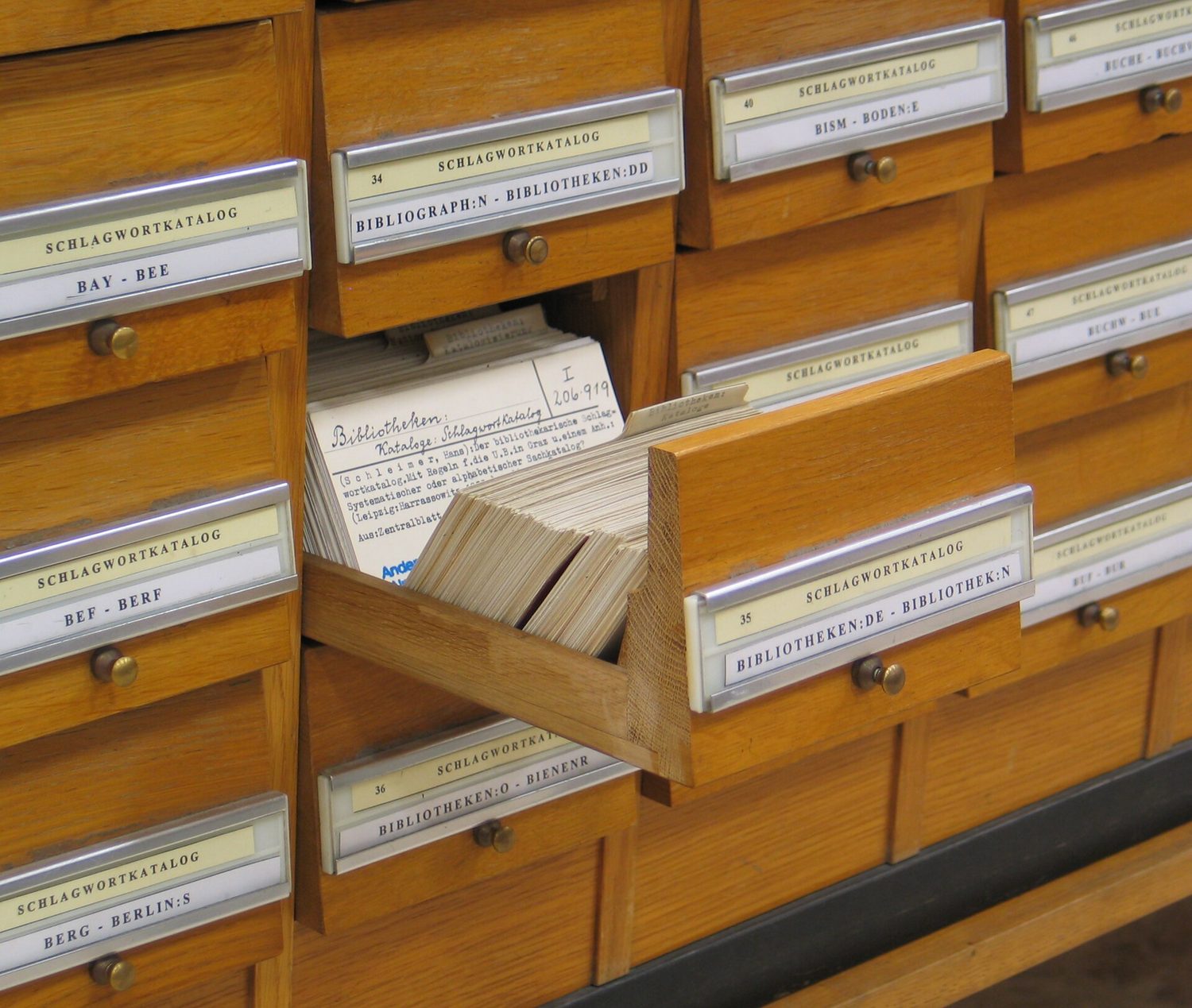
コンピュータ以前、図書館はこのような引き出しを持っていました。一冊の本につき一枚のカード、同じ数値の事実を一つずつ含み、すべて整然と並べられていたため、司書はどの本でも探せるようにしていました…

English narration · English + 中文 subtitles burned in · ⁨英語ナレーション・英語+中文字幕 burning-in⁩

Syllabus · ⁨シラバス⁩
English
Candidates should be able to: Notes and guidance
1 Define a single-table database from given data storage requirements • Including: – fields – records – validation
2 Suggest suitable basic data types • Including: – text/alphanumeric – character – Boolean – integer – real – date/time
3 Understand the purpose of a primary key and identify a suitable primary key for a given database table
4 Read, understand and complete structured query language (SQL) scripts to query data stored in a single database table • Limited to: – SELECT – FROM – WHERE – ORDER BY DESCENDING – ORDER BY ASCENDING – SUM – COUNT – AND – OR • Identifying the output given by an SQL statement that will query the given contents of a database table
日本語
受験者は以下的能力を備えているべきである: メモおよびガイドライン
1 与えられたデータ保存要件から単一テーブル・データベースを定義する • 以下を含む: – フィールド – レコード – 検証
2 適切な基本データ型を提案する • 以下を含む: – テキスト/アルファベトリック – キャラクター – ブール – 整数 – 実数 – 日付/時刻
3 プライマリ・キーの目的を理解し、与えられたデータベース・テーブルに対して適切なプライマリ・キーを特定する
4 構造化クエリ言語 (SQL) スクリプトを読み、理解し、単一のデータベース・テーブルに格納されたデータを照会するために完了させる • 制限: – SELECT – FROM – WHERE – ORDER BY DESCENDING – ORDER BY ASCENDING – SUM – COUNT – AND – OR • SQLステートメントによる出力を特定すること(そのステートメントが与えられたデータベース・テーブルの内容を照会する場合)

Source: Cambridge International syllabus · ⁨出典: Cambridge International シラバス⁩

9.1

What is a database? · ⁨データベースとは何か?⁩

English

A database 数据库 is an organised store of data, kept so that it is easy to search, sort and update. At IGCSE you work with a single-table database 单表数据库 — all the data is held in one table.

日本語

データベースは、検索・ソート・更新が容易なよう組織的に管理されたデータの保管場所です。IGCSEでは単一テーブルデータベース来处理し、すべてのデータは1つのテーブルに格納されます。

図書館のカードカタログにあるラベル付きの引き出しの列
図書館のカードカタログは紙上のデータベースです。インデックスによって検索・ソート可能なレコードがあります
データセンター内のサーバーの列
大型の現代のデータベースはデータセンターのサーバーに格納されています
9.2

Records and fields · ⁨レコードとフィールド⁩

English

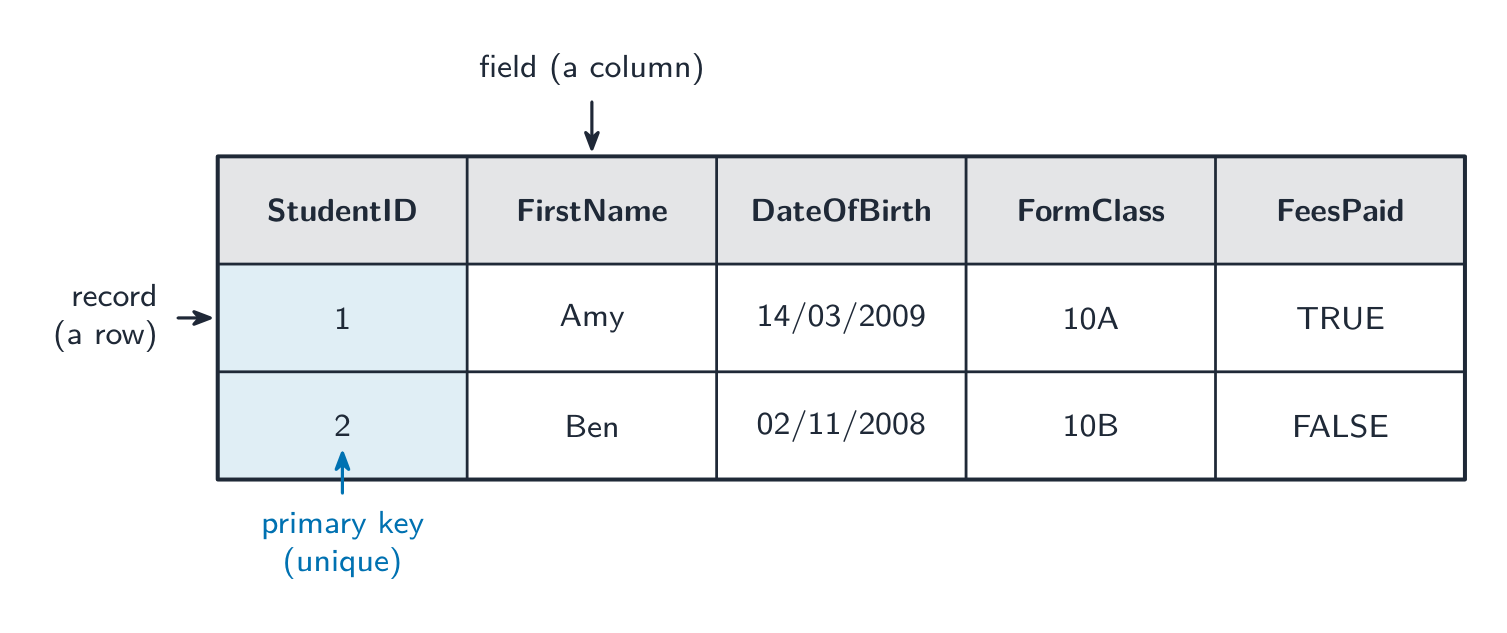
A database table is made of records and fields.

  • A record 记录 is one row in the table — all the data about one thing (for example one student).
  • A field 字段 is one column in the table — one piece of data that every record has (for example "First name").
StudentID FirstName DateOfBirth FormClass FeesPaid
1 Amy 14/03/2009 10A TRUE
2 Ben 02/11/2008 10B FALSE

Here each row is a record, and each column is a field.

日本語

データベーステーブルはレコードとフィールドで構成されます。

  • レコードは表の1行であり、ある対象に関するすべてのデータを含みます(例:1人の生徒)。
  • フィールドは表の1列であり、すべてのレコードに存在する1つのデータ項目です(例:「名前」)。
StudentID FirstName DateOfBirth FormClass FeesPaid
1 Amy 14/03/2009 10A TRUE
2 Ben 02/11/2008 10B FALSE

ここで、各行はレコードであり、各列はフィールドです。

Studentテーブル。各行はレコード、各列はフィールドとしてラベル付けされており、StudentID列が主キーとして強調表示されています
各行はレコード、各列はフィールドであり、主キー(StudentID)は各レコードごとに一意です
9.3

Data types for fields · ⁨フィールドのデータ型⁩

English

Each field stores one data type 数据类型. You choose the type that best fits the data.

Data type Used for Example
text/alphanumeric 文本 letters, digits and symbols "10A", "Amy"
character 字符 a single character 'M'
Boolean 布尔值 one of two values TRUE / FALSE
integer 整数 a whole number 42
real 实数 a number with a decimal point 3.5
date/time 日期时间 a date or a time 14/03/2009
日本語

各フィールドは1つのデータ型を格納します。データに最も適した型を選択します。

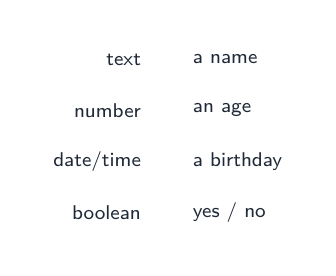
フィールドタイプ:テキスト(氏名)、数値(年齢)、日付/時間(誕生日)、ブール(はい/いいえ)
フィールドタイプ:テキスト、数値、日付/時間、ブール
Data type Used for Example
text/alphanumeric 文字、数字、記号 "10A", "Amy"
文字列 単一の文字 'M'
Boolean 2つの値のいずれか TRUE / FALSE
integer 整数 42
real 小数点を含む数 3.5
date/time 日付または時刻 14/03/2009
Vocabulary · ⁨語彙⁩ Train · ⁨練習する⁩
English 日本語
database/ˈdeɪtəbeɪs/ データベース
single-table database/ˈsɪŋɡl ˈteɪbl ˈdeɪtəbeɪs/ 単一テーブルデータベース
record/ˈrekɔːd/ record
field/fiːld/ 場として扱う
data type/ˈdeɪtə taɪp/ データ型
text/alphanumeric/tekst ˌælfənjuːˈmerɪk/ テキスト/アルファベティック
character/ˈkærɪktə/ 文字
Boolean/ˈbuːlɪən/ Boolean
integer/ˈɪntɪdʒə/ 整数
real/rɪəl/ 実数(REAL)
date/time/deɪt taɪm/ 日付/時刻
9.4

The primary key · ⁨主キー⁩

English

A primary key 主键 is a field that holds a unique 唯一的 value for every record. No two records can have the same primary key, so it lets you pick out exactly one record.

In the table above, StudentID is a good primary key because every student has a different number. A field like FormClass would be a bad primary key, because many students share the same class.

日本語

主キー(primary key) は、各レコードに対して**一意(unique)**の値を保持するフィールドです。2つのレコードが同じ主キーを持つことはできないため、特定のレコードを正確に識別できます。

上記の表において、StudentID は良い主キーです。なぜなら全生徒に異なる番号があるからです。FormClass のようなフィールドは悪い主キーとなります。なぜなら、複数の生徒が同じクラスに所属する可能性があるからです。

Vocabulary · ⁨語彙⁩ Train · ⁨練習する⁩
English 日本語
primary key/ˈpraɪməri kiː/ 主キー
unique/juːˈniːk/ 一意
9.5

Validation in a database · ⁨データベースにおける検証⁩

English

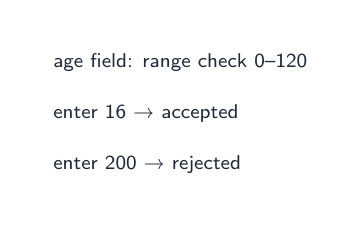
When data is put into a database, validation 验证 checks make sure it is sensible — for example a range check on an age field, or a presence check so a field is not left empty. (You saw these checks in topic 7.)

日本語

データベースにデータを入力する際、**検証(validation)**により、データが妥当であることを確認します。例えば、年齢フィールドに対する範囲チェックや、フィールドが空にならないようにする存在チェックなどです。(これらのチェックはトピック7で確認しました。)

年齢フィールドへの範囲チェック。16は受け入れ、200は拒否します
範囲チェックは妥当な値を受け入れ、それ以外を拒否します。
Vocabulary · ⁨語彙⁩ Train · ⁨練習する⁩
English 日本語
validation/ˌvælɪˈdeɪʃn/ 検証
9.6

Structured Query Language (SQL) · ⁨ストラクチャードクエリ言語 (SQL)⁩

English

Structured Query Language 结构化查询语言 (SQL) is a language used to query 查询 a database — to pick out the records you want. You must understand and complete SQL scripts.

SELECT, FROM and WHERE

  • SELECT says which fields to show.
  • FROM says which table to use.
  • WHERE gives a condition 条件, so only matching records are shown.

This shows the first name and class of every student who has paid the fees.

Use * to select all fields:

ORDER BY

ORDER BY sorts the results. Use ASC for ascending 升序 (smallest first, A→Z) or DESC for descending 降序 (largest first, Z→A).

AND and OR

Join conditions with AND (both must be true) or OR (at least one must be true).

SUM and COUNT

  • SUM adds up the values in a number field.
  • COUNT counts how many records match.

This counts how many students have not paid. SUM works the same way but adds a number field instead of counting rows.

Working out the output

To find the output of an SQL script, read it in this order:

  1. FROM — which table;
  2. WHERE — keep only the records that match the condition;
  3. SELECT — show only the chosen fields;
  4. ORDER BY — put the results in order.

Following these steps, you can write down exactly which rows and columns the query returns.

Worked example. A Book table has the fields Title, Author, Price and InStock. Write a query showing the title and price of every book by Orwell that is in stock, cheapest first.

Build it in the reading order: FROM names the table; WHERE keeps only the matching records, and because there are two conditions they need AND; SELECT shows only the two fields asked for; ORDER BY … ASC sorts them. Text values go in quotes, and only the fields the question asks for belong in SELECT - adding Author just because you filtered on it is the commonest way to lose a mark here.

日本語

ストラクチャードクエリ言語(Structured Query Language) (SQL)は、データベースを**照会(query)**するために使用される言語です。つまり、必要なレコードを抽出するためのものです。SQLスクリプトを理解し、実行できる必要があります。

SELECT, FROM および WHERE

  • SELECT はどのフィールドを表示するかを指定します。
  • FROM はどのテーブルを使用するかを指定します。
  • WHERE は**条件(condition)**を与え、一致するレコードのみを表示します。
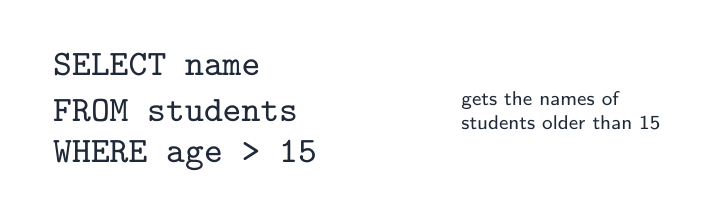
SQLクエリ:SELECT name FROM students WHERE age > 15
SELECTはフィールドを選択し、FROMはテーブル名を指定し、WHEREは条件を設定します。
SELECT FirstName, FormClass
FROM Student
WHERE FeesPaid = TRUE;

これは、授業料を納入した全生徒の氏名とクラスを表示します。

* を使用してすべてのフィールドを選択します:

SELECT *
FROM Student
WHERE FormClass = '10A';

ORDER BY

ORDER BY は結果をソートします。ASC を使用して昇順(最小値優先、A→Z)またはDESC を使用して降順(最大値優先、Z→A)にソートします。

SELECT FirstName, DateOfBirth
FROM Student
ORDER BY DateOfBirth ASC;

AND および OR

条件をAND (AND: 両方が真である必要がある) または OR (OR: 少なくとも一方が真であればよい) で結合します。

SELECT FirstName
FROM Student
WHERE FormClass = '10A' AND FeesPaid = FALSE;

SUM と COUNT

  • SUM は数値フィールドの値を合計します。
  • COUNT は一致するレコードの数を数えます。
SELECT COUNT(StudentID)
FROM Student
WHERE FeesPaid = FALSE;

これは、未納の生徒の数を数えます。SUM も同様に動作しますが、行数を数える代わりに数値フィールドを加算します。

出力の計算

SQLスクリプトの出力を見つけるには、この順序で読み取ります:

  1. FROM — どのテーブルか;
  2. WHERE — 条件に一致するレコードのみを残す;
  3. SELECT — 選択したフィールドのみを表示;
  4. ORDER BY — 結果を並べ替える。
4つの手順(順序通り):FROM(どのテーブルから)、WHERE(一致する行を保持)、SELECT(選択したフィールドを表示)、ORDER BY(結果を並べ替える)
SQLクエリをこの順で読む:FROM(どのテーブル)、WHERE(どの行)、SELECT(どのフィールド)、ORDER BY(並べ替え)

これらの手順に従うことで、クエリが返す正確な行と列を特定できます。

** worked example.** Book テーブルには、Title、Author、Price、InStock というフィールドがあります。Orwellによるすべての在庫のある本のタイトルと価格を示し、最安値を先に表示するクエリを作成してください。

SELECT Title, Price
FROM Book
WHERE Author = 'Orwell' AND InStock = TRUE
ORDER BY Price ASC;

読み順に合わせて構築します:FROM はテーブル名を指定し;WHERE は一致するレコードのみを保持し、条件が2つあるため AND が必要です;SELECT は質問で求められた2つのフィールドのみを表示します;ORDER BY … ASC で並べ替えます。テキスト値は引用符で囲み、SELECT に含まれるのは質問で求められたフィールドのみです。単にフィルタリングに使用したというだけで Author を追加することは、ここで失点する最も一般的な方法です。

Explore · ⁨探索⁩

SELECT … WHERE

Step through a query: WHERE filters rows, SELECT picks columns. · ⁨クエリを追跡する:WHERE句が行をフィルタリングし、SELECT句が列を選択します。⁩

Vocabulary · ⁨語彙⁩ Train · ⁨練習する⁩
English 日本語
structured query language/ˈstrʌktʃəd ˈkwɪərɪ ˈlæŋɡwɪdʒ/ 構造化クエリ言語
query/ˈkwɪərɪ/ 照会
condition/kənˈdɪʃn/ 条件
ascending/əˈsendɪŋ/ 昇順
descending/dɪˈsendɪŋ/ 降順
9.7

Exam tips · ⁨試験対策⁩

English
  • A record is a row (all the data about one thing); a field is a column (one item that every record has).
  • A primary key must be unique for every record, so it picks out exactly one record (StudentID, not FormClass).
  • Learn the SQL parts: SELECT (which fields), FROM (which table), WHERE (the condition), ORDER BY (sort, ASC or DESC).
  • Read a query in the order FROM → WHERE → SELECT → ORDER BY to work out its output.
  • COUNT counts the matching records; SUM adds up a number field.
日本語
  • レコードとは行のこと(1つの対象に関するすべてのデータ);フィールドとはカラムのこと(各レコードが持つ1つの項目)。
  • プライマリキーは、各レコードに対して一意である必要があり、したがってちょうど1つのレコードを特定します(StudentIDであり、FormClassではありません)。
  • SQLの構成要素を学びます:SELECT (どのフィールド)、FROM (どのテーブル)、WHERE (条件)、ORDER BY (並べ替え、ASCまたはDESC)。
  • クエリの出力を理解するために、FROM → WHERE → SELECT → ORDER BY の順で読みます。
  • COUNT は一致するレコード数をカウントします;SUM は数値フィールドの合計を計算します。

Interactive lessons on this topic · ⁨このトピックのインタラクティブ授業⁩

Work through it step by step, with instant-check exercises. · ⁨一歩ずつ進め、即時チェック付きの問題で学習します。⁩

Past Papers · ⁨過去問⁩

More topics in IGCSE Computer Science · ⁨IGCSE コンピューター科学⁩ · ⁨IGCSE Computer Science · ⁨IGCSE コンピューター科学⁩ の他のトピック⁩

Log in or create account · ⁨ログインまたはアカウント作成⁩

IGCSE, A-Level & AP