Showing and hiding (display) · 表示と非表示 (display)
This page needs a recent browser (with SharedArrayBuffer support). Please update Chrome, Edge, Firefox or Safari to the latest version. · このページには最新のブラウザ(SharedArrayBuffer対応)が必要です。Chrome、Edge、Firefox、Safariを最新バージョンに更新してください。
English
How boxes flow
- Some elements are block: they stack on top of each other and fill the width —
<div>,<p>,<h1>. - Some are inline: they sit side by side, taking only as much room as they need —
<span>,<a>,<strong>. displaylets you change which way an element behaves.
日本語
ボックスの配置
- 一部の要素はブロックです:上下に積み重ねられ、横幅全体を満たします —
<div>、<p>、<h1>。 - 一部の要素はインラインです:横並びに配置され、必要な分のスペースしか取りません —
<span>、<a>、<strong>。 displayを使って要素の動作方法を変更できます。
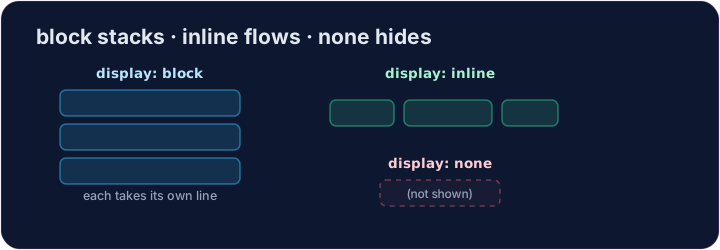
English
display: none
display: none;removes an element from the page completely.- It's how menus, pop-ups, and "read more" sections stay hidden until needed.
- The element is still in your HTML — it just isn't shown.
日本語
display: none
display: none;は要素をページから完全に除外します。- メニュー、ポップアップ、「続きを読む」セクションなどが、必要になるまで非表示のままにするための方法です。
- 要素はHTML内にまだ存在しますが、表示されません。
<style>
  .pill { display: inline; background-color: #def; padding: 6px; }
  .gone { display: none; }
</style>
<span class="pill">Visible</span>
<span class="gone">You can't see me</span>
English
Common mistakes
display: noneremoves the element and its space;visibility: hiddenkeeps its space.blockstarts a new line;inlinedoes not.
日本語
よくあるミス
display: noneは要素とそのスペースを削除しますが、visibility: hiddenはスペースを保持します。blockは新しい行を始めますが、inlineはそうしません。
English
Now you try
display: nonehides;display: blockmakes an element take its own line.- Hide one element, then change how another displays.
日本語
あなたも試してみよう
display: noneは非表示にし、display: blockは要素を各自の行に配置します。- 1つの要素を非表示にし、別の要素の表示方法を changes します。
Hide the secret message. Add .secret { display: none; }. · 秘密のメッセージを非表示にしてください。.secret { display: none; }を追加してください。
Make each label sit on its own line. Add .label { display: block; }. · 各ラベルを独自の行に配置してください。.label { display: block; }を追加してください。