Lists · リスト
This page needs a recent browser (with SharedArrayBuffer support). Please update Chrome, Edge, Firefox or Safari to the latest version. · このページには最新のブラウザ(SharedArrayBuffer対応)が必要です。Chrome、Edge、Firefox、Safariを最新バージョンに更新してください。
English
Lists
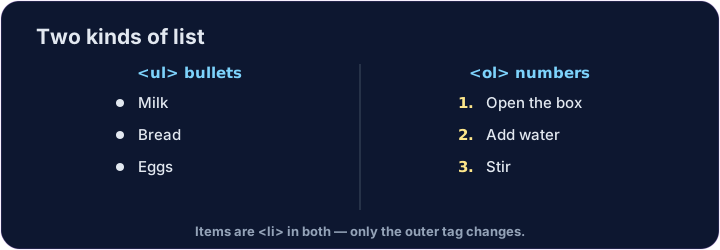
- Use a list when you have several items.
- A bullet list uses
<ul>(unordered list). - Each item goes inside its own
<li>(list item).
日本語
リスト
- 複数の項目がある場合、リストを使用します。
- バレットリスト は
<ul>(順序なしリスト)を使用します。 - 各項目は独立した
<li>(リストアイテム)の中に置きます。
<ul>
  <li>Milk</li>
  <li>Bread</li>
  <li>Eggs</li>
</ul>
English
Numbered lists
- For steps in order, use
<ol>(ordered list). - The browser adds the numbers 1, 2, 3 for you.
- The items are still
<li>— only the outer tag changes.
日本語
番号付きリスト
- 順序立てて並べたい手順 には
<ol>(順序ありリスト)を使用します。 - ブラウザが自動的に 1, 2, 3 の番号を振ります。
- 項目はまだ
<li>です — 外側のタグが変わるだけです。
<ol>
  <li>Open the box</li>
  <li>Add water</li>
  <li>Stir</li>
</ol>
English
Common mistakes
<ul>is bullets,<ol>is numbers; each item goes in<li>.- Close every
<li>.
日本語
よくあるミス
<ul>はバレット、<ol>は番号、各項目は<li>に入れます。- 关闭所有的
<li>。
English
Now you try
- Notice how the
<li>items sit inside the<ul>or<ol>. - Build one of each below.
日本語
あなたも試してみよう
<li>の項目が<ul>や<ol>の 内側 にあることに気づいてください。- 下にそれぞれ1つずつ作ってみましょう。
Make a bullet list with three items: Apples, Bananas, Cherries. Put each one in its own <li>. · 3つの項目を持つ箇条書きを作成してください: Apples, Bananas, Cherries。それぞれを独自の<li>に入れてください。
Make a numbered list with at least two steps. Use <ol> with <li> items inside. · 番号付きリストを少なくとも2ステップ作成してください。<ol>を使用し、その中に<li>項目を含めてください。