Capstone: a one-page report · Capstone:1ページのレポート
This page needs a recent browser (with SharedArrayBuffer support). Please update Chrome, Edge, Firefox or Safari to the latest version. · このページには最新のブラウザ(SharedArrayBuffer対応)が必要です。Chrome、Edge、Firefox、Safariを最新バージョンに更新してください。
English
Putting it all together
- You now know the core of LaTeX: structure, formatting, maths, lists, and more.
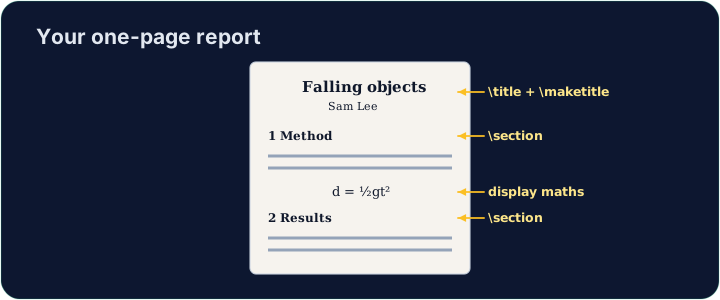
- A real document is just these pieces, combined. Let's build a small report.
日本語
まとめ
- これでLaTeXの核心である、構造、フォーマット、数式、リストなどについて知りました。
- 実際の文書はこれらの要素を組み合わせたものです。小さなレポートを作ってみましょう。
English
Your toolkit recap
- Structure:
\section,\maketitle. - Text:
\textbf,\emph. - Maths:
$ ... $,\frac,\sqrt. - Lists:
itemizeandenumerate.
日本語
ツールのまとめ
- 構造:
\section、\maketitle。 - テキスト:
\textbf、\emph。 - 数式:
$ ... $、\frac、\sqrt。 - リスト:
itemizeとenumerate。
English
Build the report
- The starter has a title block ready. Add a
\section, a bulleted list, and one inline formula. - Run often to watch the PDF take shape — that fast feedback is the joy of LaTeX.
- When it looks good, press Check. Congratulations — you can write LaTeX!
日本語
レポートの作成
- スタートテンプレートにはタイトルブロックが用意されています。
\section、箇条書きリスト、インライン数式を1つ追加してください。 - 頻繁に実行してPDFがどのように形成されるか確認してください — この素早いフィードバックこそがLaTeXの魅力です。
- 完成したら、Check を押してください。おめでとうございます — LaTeXが書けるようになりました!
English
Common mistakes
- Build the document in parts and compile often.
- A single missing
}or$can stop the whole compile — read the first error.
日本語
よくあるミス
- 文書は部分に分けて作成し、頻繁にコンパイルしてください。
}または$が一つでも欠けるとコンパイル全体が失敗します。最初のエラーメッセージを読んでください。
Finish this report using what you have learned. Add at least one \section, a bulleted list (\begin{itemize} with \items), and one inline formula in $ ... $. Then Run to admire your PDF. · 学んだことを活かしてこのレポートを完成させます。少なくとも1つの\section、箇条書きリスト (\begin{itemize} と\items)、および$ ... $ 内のインライン数式を追加します。その後、Run を実行してPDFをお楽しみください。
Click Run to compile and preview the PDF. · コンパイルしてPDFをプレビューするには「実行」をクリックしてください。
Polish the report. Break one section into a \subsection, and add a short numbered enumerate list of next steps. Small structure like this is what makes a report readable. · レポートをブラッシュアップします。1つのセクションを \subsection に分割し、次のステップの短い番号付き enumerate リストを追加します。このような小さな構造がレポートを読みやすくします。
Click Run to compile and preview the PDF. · コンパイルしてPDFをプレビューするには「実行」をクリックしてください。