Array methods · 配列メソッド
This page needs a recent browser (with SharedArrayBuffer support). Please update Chrome, Edge, Firefox or Safari to the latest version. · このページには最新のブラウザ(SharedArrayBuffer対応)が必要です。Chrome、Edge、Firefox、Safariを最新バージョンに更新してください。
English
Array methods
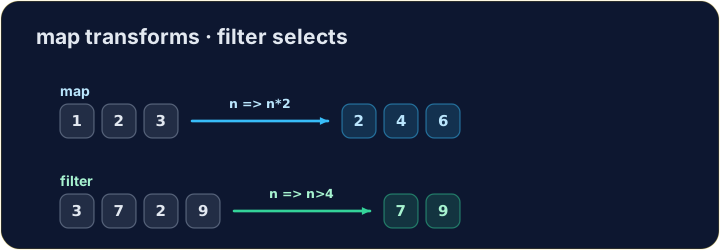
.map(fn)makes a new array by transforming each item..filter(fn)makes a new array of only the items wherefnreturnstrue..forEach(fn)runsfnfor each item, making no new array.
日本語
配列メソッド
.map(fn)は各項目を変換することで新しい配列を作成します。.filter(fn)はfnがtrueを返す項目のみを含む新しい配列を作成します。.forEach(fn)は各項目に対してfnを実行しますが、新しい配列は作成しません。
let nums = [1, 2, 3];
let doubled = nums.map((n) => n * 2);
console.log(doubled);   // → [2,4,6]
English
Filtering keeps some items
.filterkeeps each item for which the test returnstrue.
日本語
フィルターで一部の項目を保持する
.filterはテストがtrueを返す各項目を保持します。
let nums = [3, 7, 2, 9];
let big = nums.filter((n) => n > 4);
console.log(big);   // → [7,9]
English
Watch out
.mapand.filterreturn a new array — the original is untouched.- You hand each one an arrow function that says what to do with one item.
日本語
注意
.mapと.filterは新しい配列を返すため、元の配列は変更されません。- 各メソッドに対して、1つの項目に対する処理内容を指定するアロー関数を渡します。
English
Common mistakes
mapandfilterreturn a NEW array — they do not change the original.forEachjust loops and returns nothing.
日本語
よくあるミス
mapとfilterはNEW(新しい)配列を返すため、元の配列を変更しません。forEachはループを走らせるだけで、何も返しません。
English
Now you try
- Use
.map,.filteror.forEach. - Press Check answer to test it.
日本語
あなたも試してみよう
.map、.filterまたは.forEachを使用してください。- Check answer を押して確認する。
Use .map to double every number in [1, 2, 3] and store the new array in result (it should be [2, 4, 6]). · .mapを使用して[1, 2, 3]内のすべての数字を倍にし、新しい配列をresultに格納する(その値は[2, 4, 6]となるべきである)。
Click Run to see the output here. · 実行ボタンをクリックして出力を確認してください。
Use .filter to keep only the numbers greater than 4 from [3, 7, 2, 9, 1], in a variable big (it should be [7, 9]). · .filterを使用して、[3, 7, 2, 9, 1]から4より大きい数字のみを残し、変数bigに格納する(その値は[7, 9]となるべきである)。
Click Run to see the output here. · 実行ボタンをクリックして出力を確認してください。
Use .forEach to add every number in [4, 8, 15] to total (it should end up 27). · .forEachを使用して、[4, 8, 15]のすべての数値をtotalに加算してください(最終結果は27になります)。
Click Run to see the output here. · 実行ボタンをクリックして出力を確認してください。