Grouping with GROUP BY · Pengelompokan dengan GROUP BY
Grouping rows with GROUP BY
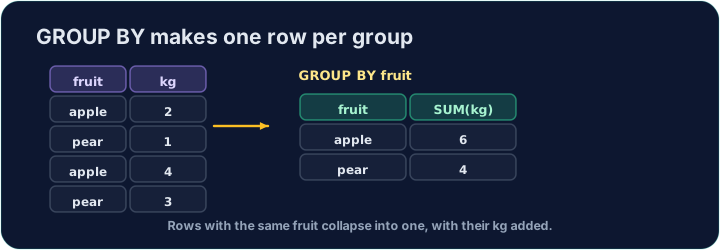
An aggregate like AVG normally summarises the whole table into one number. GROUP BY splits the rows into groups that share a value, and gives one summary row per group:
This gives one row for each form, with that form's count and average.
Mengelompokkan baris dengan GROUP BY
Agregat seperti AVG biasanya meringkas seluruh tabel menjadi satu angka. GROUP BY membagi baris ke dalam kelompok yang memiliki nilai yang sama, dan memberikan satu baris ringkasan per kelompok:
SELECT form, COUNT(*) AS n, ROUND(AVG(score), 2) AS avg_score
FROM student
GROUP BY form;
Ini memberikan satu baris untuk setiap form, dengan jumlah dan rata-rata kelas tersebut.
Filtering groups with HAVING
WHERE filters rows before grouping. To filter the groups themselves — using an aggregate — use HAVING:
This keeps only forms with 3 or more students. (WHERE cannot test COUNT(*); HAVING can.)
Memfilter kelompok dengan HAVING
WHERE memfilter baris sebelum pengelompokan. Untuk memfilter kelompok itu sendiri — menggunakan fungsi agregat — gunakan HAVING:
SELECT form, COUNT(*) AS n
FROM student
GROUP BY form
HAVING COUNT(*) >= 3;
Ini hanya menyimpan kelas dengan 3 atau lebih siswa. (WHERE tidak dapat menguji COUNT(*); HAVING dapat.)
Common mistakes
- Filter groups with
HAVING, rows withWHERE. - A plain column beside an aggregate must be in
GROUP BY.
Kesalahan Umum
- Filter kelompok dengan
HAVING, baris denganWHERE. - Kolom biasa di samping fungsi agregat harus berada dalam
GROUP BY.
For each form, show the form, the number of students as n, and the average score (2 d.p.) as avg_score. Group by form. · Untuk setiap form, tampilkan kelas, jumlah siswa sebagai n, dan rata-rata nilai (2 d.p.) sebagai avg_score. Kelompokkan berdasarkan form.
Click Run to see the output here. · Klik Jalankan untuk melihat output di sini.
Show each form and its student count n, but only for forms with 3 or more students. Use HAVING. · Tampilkan setiap form dan jumlah siswanya n, tetapi hanya untuk kelas dengan 3 atau lebih siswa. Gunakan HAVING.
Click Run to see the output here. · Klik Jalankan untuk melihat output di sini.