Reading files · Membaca file
This page needs a recent browser (with SharedArrayBuffer support). Please update Chrome, Edge, Firefox or Safari to the latest version. · Halaman ini memerlukan browser terbaru (dengan dukungan SharedArrayBuffer). Silakan perbarui Chrome, Edge, Firefox, atau Safari ke versi terbaru.
English
Reading a file
catprints a file's contents straight to the screen:
- It is named after "concatenate" — it can also join several files together.
Bahasa Indonesia
Membaca fail
catmencetak isi file langsung ke layar:
cat poem.txt
- Dinamai berdasarkan "concatenate" — ia juga bisa menggabungkan beberapa file.
English
Just the start or end
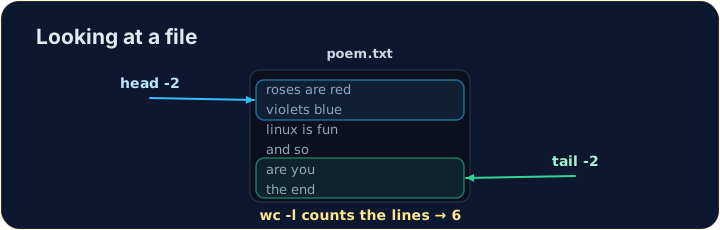
- For a long file you often want only a peek:
headshows the first lines,tailshows the last lines.
- The
-noption chooses how many lines.
Bahasa Indonesia
Hanya bagian awal atau akhir
- Untuk file panjang, Anda sering hanya ingin melihat sekilas:
headmenampilkan baris awal,tailmenampilkan baris akhir.
head -n 2 poem.txt
tail -n 1 poem.txt
- Opsi
-nmemilih berapa banyak baris.
English
Counting
wc(word count) measures a file. The most useful option is-lfor lines:
wc -wcounts words andwc -ccounts characters. Now try the tasks.
Bahasa Indonesia
Menghitung
wc(word count) mengukur ukuran file. Opsi paling berguna adalah-luntuk baris:
wc -l poem.txt
wc -wmenghitung kata danwc -cmenghitung karakter. Sekarang coba tugas-tugasnya.
English
Common mistakes
catprints a whole file at once; uselessto scroll a large one.- Press Tab to complete a long file name.
Bahasa Indonesia
Kesalahan umum
catmencetak seluruh file sekaligus; gunakanlessuntuk menggulir file yang besar.- Tekan Tab untuk melengkapi nama file yang panjang.
Use cat to print the whole contents of poem.txt. · Gunakan cat untuk mencetak seluruh isi poem.txt.
How many lines does the poem have? Use wc -l poem.txt to count them. · Berapa banyak baris puisi? Gunakan wc -l poem.txt untuk menghitungnya.