Colour and links · Warna dan tautan
This page needs a recent browser (with SharedArrayBuffer support). Please update Chrome, Edge, Firefox or Safari to the latest version. · Halaman ini memerlukan browser terbaru (dengan dukungan SharedArrayBuffer). Silakan perbarui Chrome, Edge, Firefox, atau Safari ke versi terbaru.
English
Adding colour
- The
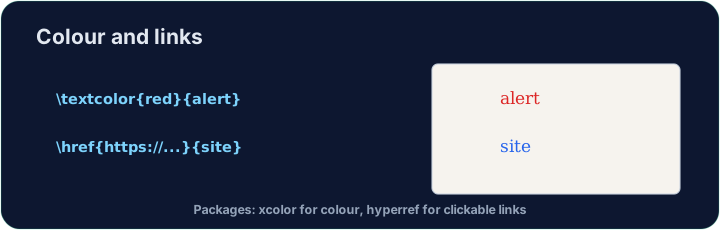
xcolorpackage lets you colour text. Load it, then wrap words:
- Built-in names include
red,blue,green,orange,gray, and more.
Bahasa Indonesia
Menambahkan warna
- Paket
xcolormemungkinkan Anda mewarnai teks. Muat, lalu bungkus kata-kata:
\usepackage{xcolor}
...
\textcolor{red}{This is red} and \textcolor{blue}{this is blue}.
- Nama bawaan meliputi
red,blue,green,orange,gray, dan lain-lain.
English
Highlights and your own colours
\colorbox{yellow}{text}puts a highlight behind the words.- You can even mix your own:
\textcolor{red!60}{...}is 60% red (lighter).
Bahasa Indonesia
Sorotan dan warna Anda sendiri
\colorbox{yellow}{text}menempatkan sorotan di belakang kata-kata.- Anda bahkan bisa mencampurkan warna Anda sendiri:
\textcolor{red!60}{...}adalah 60% merah (lebih terang).
English
Clickable links
- The
hyperrefpackage turns cross-references and web addresses into clickable links:
- Load
hyperreflast in your preamble — it likes to have the final word.
Bahasa Indonesia
Tautan yang dapat diklik
- Paket
hyperrefmengubah referensi silang dan alamat web menjadi tautan yang dapat diklik:
\usepackage{hyperref}
...
Visit \href{https://ctan.org}{CTAN} for packages.
- Muat
hyperrefterakhir di preamblen Anda — ia ingin memiliki kata terakhir.
English
Common mistakes
- Load
xcolorfor colour andhyperreffor clickable links. - Load
hyperreflast among your packages.
Bahasa Indonesia
Kesalahan umum
- Muat
xcoloruntuk warna danhyperrefuntuk tautan yang dapat diklik. - Muat
hyperrefterakhir di antara paket-paket Anda.
Load xcolor, then make the word warning red with \textcolor{red}{warning}. You need both the package and the command. · Muat xcolor, lalu buat kata warning menjadi merah dengan \textcolor{red}{warning}. Anda membutuhkan kedua paket dan perintah ini.
Click Run to compile and preview the PDF. · Klik Jalankan untuk mengkompilasi dan pratinjau PDF.
Make a clickable link. Load hyperref, then turn the word CTAN into a link with \href{https://ctan.org}{CTAN}. Load hyperref last in the preamble. · Buat tautan yang dapat diklik. Muat hyperref, lalu ubah kata CTAN menjadi tautan dengan \href{https://ctan.org}{CTAN}. Muat hyperref terakhir di pendahuluan.
Click Run to compile and preview the PDF. · Klik Jalankan untuk mengkompilasi dan pratinjau PDF.