Labels and cross-references · Label dan referensi silang
This page needs a recent browser (with SharedArrayBuffer support). Please update Chrome, Edge, Firefox or Safari to the latest version. · Halaman ini memerlukan browser terbaru (dengan dukungan SharedArrayBuffer). Silakan perbarui Chrome, Edge, Firefox, atau Safari ke versi terbaru.
English
Never write "see Section 3" by hand
- If you write a number by hand and later add a section, every number is wrong.
- LaTeX solves this with labels. Tag something:
- The name
sec:methodsis just a nickname you choose.
Bahasa Indonesia
Jangan pernah tulis "lihat Bagian 3" secara manual
- Jika Anda menulis angka secara manual dan kemudian menambahkan bagian, setiap angka menjadi salah.
- LaTeX menyelesaikan ini dengan label. Beri tag sesuatu:
\section{Methods}\label{sec:methods}
- Nama
sec:methodshanyalah nama panggilan yang Anda pilih.
English
Refer to it anywhere
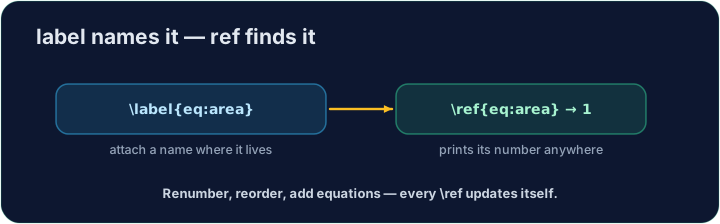
- Then point at it with
\ref— LaTeX inserts the current number:
- The
~is a space that never breaks across lines, so "Section" and its number stay together.
Bahasa Indonesia
Rujuk ke mana saja
- Kemudian tunjuk ke sana dengan
\ref— LaTeX menyisipkan nomor saat ini:
As shown in Section~\ref{sec:methods}, ...
~adalah spasi yang tidak pernah terputus oleh baris, sehingga "Bagian" dan nomornya tetap bersama.
English
It needs two passes
- On the first compile LaTeX learns the numbers; on the second it fills them in.
- Our Run does this for you automatically. (The same trick powers a table of contents.)
Bahasa Indonesia
Memerlukan dua kali proses
- Pada kompilasi pertama, LaTeX mempelajari nomor; pada yang kedua, ia mengisinya.
- Run kami melakukan ini untuk Anda secara otomatis. (Trik yang sama memunculkan daftar isi.)
English
Common mistakes
- Put
\label{...}after what you want to name, then refer to it with\ref{...}. - Compile twice so cross-references settle to the right numbers.
Bahasa Indonesia
Kesalahan umum
- Tempatkan
\label{...}setelah apa yang ingin Anda beri nama, lalu rujuk dengan\ref{...}. - Kompilasi dua kali agar referensi silang menyesuaikan ke nomor yang benar.
Label the Methods section with \label{sec:methods}, then refer to it from the last line with \ref{sec:methods}. LaTeX fills in the correct number for you. · Beri label pada Bagian Metode dengan \label{sec:methods}, kemudian rujuk ke bagian tersebut dari baris terakhir dengan \ref{sec:methods}. LaTeX akan mengisi nomor yang benar untuk Anda.
Click Run to compile and preview the PDF. · Klik Jalankan untuk mengkompilasi dan pratinjau PDF.
The same numbering machinery builds a table of contents. Add \tableofcontents as the first line of the body — LaTeX lists every section automatically. · Mesin penomoran yang sama membangun daftar isi. Tambahkan \tableofcontents sebagai baris pertama di badan dokumen — LaTeX akan mencantumkan setiap bagian secara otomatis.
Click Run to compile and preview the PDF. · Klik Jalankan untuk mengkompilasi dan pratinjau PDF.