Inserting rows · הוספת שורות
Adding rows with INSERT
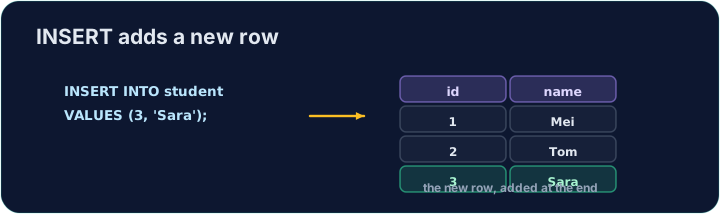
INSERT adds a new row to a table. List the columns, then a matching set of VALUES:
Text goes in single quotes; numbers do not. The values must line up with the columns, in the same order.
הוספת שורות עם INSERT
INSERT מוסיף שורה חדשה לטבלה. רשימו את העמודות, ולאחר מכן סט תואם של VALUES:
INSERT INTO product (code, title, price, in_stock)
VALUES ('P04', 'Ruler', 1.20, 75);
טקסט נכנס בתוך סימני ציטוט; מספרים לא. הערכים חייבים להיות מיושרים עם העמודות, באותו סדר.
Seeing the effect
INSERT changes the data but returns no rows itself, so Run just reports how many rows changed. To see the new row, run a SELECT afterwards.
The checker does this for you: it runs your INSERT, then reads the table back to confirm your row is there.
ראיה בהשפעה
INSERT משנה את הנתונים אך לא מחזירה שורות עצמה, לכן Run מדווח רק כמה שורות השתנו. כדי לראות את השורה החדשה, רץ SELECT לאחר מכן.
הבוחן עושה זאת עבורך: הוא רץ את ה-INSERT שלך, ואז קורא את הטבלה מחדש כדי לאמת שהשורה שלך קיימת.
Common mistakes
- The values must line up with the columns in order and type.
- Quote text values with single quotes.
טעויות נפוצות
- הערכים חייבים להיות מיושרים עם העמודות בסדר ובסוג.
- סביב ערכי טקסט השתמש בסימני ציטוט יחידים.
Add a new product to the product table: code 'P04', title 'Ruler', price 1.20, in_stock 75. · הוסף מוצר חדש לטבלת הproduct: קוד 'P04', כותרת 'Ruler', מחיר 1.20, זמין במלאי 75.
Click Run to see the output here. · לחץ על הרץ כדי לראות את התוצא כאן.
Add a new customer to the customer table: id 5, name 'Eve', city 'York'. List the columns you are filling, then give the matching VALUES. · הוסף לקוח חדש לטבלת הcustomer: id 5, name 'Eve', city 'York'. ציין את העמודות שאתה ממלא, ולאחר מכן תן את הVALUES המתאים.
Click Run to see the output here. · לחץ על הרץ כדי לראות את התוצא כאן.