Users and sudo · משתמשים ו-sudo
This page needs a recent browser (with SharedArrayBuffer support). Please update Chrome, Edge, Firefox or Safari to the latest version. · עמוד זה דורש דפדפן עדכני (תומך ב-SharedArrayBuffer). אנא עדכן את Chrome, Edge, Firefox או Safari לגרסה העדכנית ביותר.
English
Many users, one computer
- Linux was built for many people to share one machine safely.
- Each person has a user account.
whoamitells you who you currently are:
- Your files are yours; other users cannot read or change them unless you allow it.
עברית
משתמשים רבים, מחשב אחד
- Linux נבנה עבור משתמשים רבים לשתף במכשיר אחד בצורה בטוחה.
- לכל אדם יש חשבון משתמש.
whoamiאומר מי אתה כרגע:
whoami
- הקבצים שלך שייכים לך; משתמשים אחרים אינם יכולים לקרוא או לשנות אותם אלא אם כן אתה מאפשר זאת.
English
The superuser: root
- One special user, root, can do anything — change any file, install software, manage other users.
- With great power comes great danger: a wrong command as root can break the whole system.
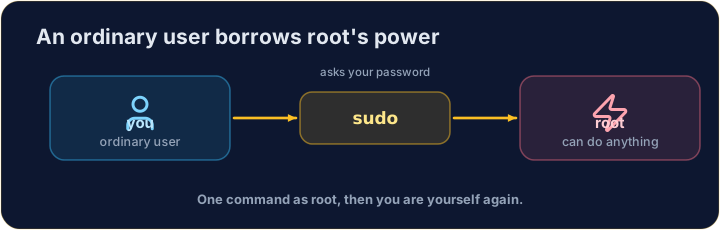
- So you normally work as an ordinary user, and only become root when you must.
עברית
המשתמש העליון: root
- משתמש ייחודי אחד, root, יכול לעשות כל דבר — לשנות כל קובץ, להתקין תוכנה, לנהל משתמשים אחרים.
- עם כוח גדול בא איום גדול: פקודה שגויה כ-root עלולה להרוס את כל המערכת.
- לכן בדרך כלל עובדים כמשתמש רגיל, ומפגישים כ-root רק כאשר חובה.
English
sudo — borrow root for one command
sudoruns a single command as root (it asks for your password first):
- Think of it as "do this super-user do". Use it only when a task truly needs admin rights — and read the command twice before you press Enter.
עברית
sudo — השאלת זכויות root לפקודה אחת
sudoמפעיל פקודה בודדת כ-root (הוא מבקש תחילה את הסיסמה שלך):
sudo apt install git
- חשב בזה כ"עשה את זה סופר-משתמש דו". השתמש בו רק כאשר משימה באמת דורשת זכויות אדמין — וקרא את הפקודה פעמיים לפני שתלחץ Enter.
English
Common mistakes
sudoruns one command as the administrator — use it carefully.- Do not put
sudoin front of everything.
עברית
טעויות נפוצות
sudoרץ פקודה אחת כמנהל מערכת — השתמש בזה בקפידה.- אל תשים את
sudoלפני כל דבר.
Print the name of the user you are logged in as, with whoami. · הדפס את שם המשתמש שבו נכנסת, עם whoami.
Every machine has a name too. Print the name of the computer you are on with hostname. · לכל מחשב יש גם שם. הדפס את שם המחשב שאתה עומד עליו עם hostname.