Reading files · קריאת קבצים
This page needs a recent browser (with SharedArrayBuffer support). Please update Chrome, Edge, Firefox or Safari to the latest version. · עמוד זה דורש דפדפן עדכני (תומך ב-SharedArrayBuffer). אנא עדכן את Chrome, Edge, Firefox או Safari לגרסה העדכנית ביותר.
English
Reading a file
catprints a file's contents straight to the screen:
- It is named after "concatenate" — it can also join several files together.
עברית
קריאה מקובץ
catמדפיק תוכני קובץ ישירות למסך:
cat poem.txt
- הוא קרוי על שם "concatenate" — הוא יכול גם לחבר מספר קבצים יחד.
English
Just the start or end
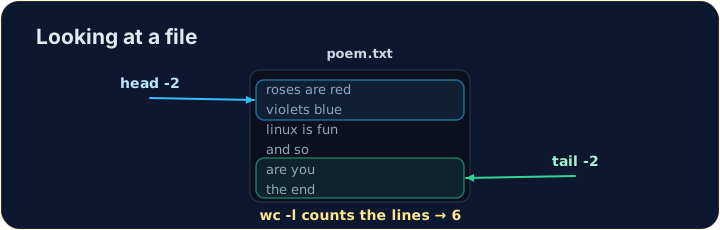
- For a long file you often want only a peek:
headshows the first lines,tailshows the last lines.
- The
-noption chooses how many lines.
עברית
רק ההתחלה או הסוף
- עבור קובץ ארוך לעיתים קרובות תרצה רק מבט חטוף:
headמציג את הקווים הראשונים,tailמציג את הקווים האחרונים.
head -n 2 poem.txt
tail -n 1 poem.txt
- האפשרות
-nקובעת כמה קווים יוצגו.
English
Counting
wc(word count) measures a file. The most useful option is-lfor lines:
wc -wcounts words andwc -ccounts characters. Now try the tasks.
עברית
ספירה
wc(word count) מדד קובץ. האפשרות המועילה ביותר היא-lעבור קווים:
wc -l poem.txt
wc -wסופר מילים וwc -cסופר תווים. כעת נסו את המשימות.
English
Common mistakes
catprints a whole file at once; uselessto scroll a large one.- Press Tab to complete a long file name.
עברית
טעויות נפוצות
catמודע קובץ שלם בבת אחת; השתמשו בlessכדי לגלגל קובץ גדול.- לחצו על Tab כדי להשלמת שם קובץ ארוך.
Use cat to print the whole contents of poem.txt. · השתמש ב-cat כדי להדפיס את כל התוכן של poem.txt.
How many lines does the poem have? Use wc -l poem.txt to count them. · כמה שורות יש בשיר? השתמש ב-wc -l poem.txt לספור אותן.