Maths — your first formula · מתמטיקה — הנוסחה הראשונה שלך
This page needs a recent browser (with SharedArrayBuffer support). Please update Chrome, Edge, Firefox or Safari to the latest version. · עמוד זה דורש דפדפן עדכני (תומך ב-SharedArrayBuffer). אנא עדכן את Chrome, Edge, Firefox או Safari לגרסה העדכנית ביותר.
English
Maths mode
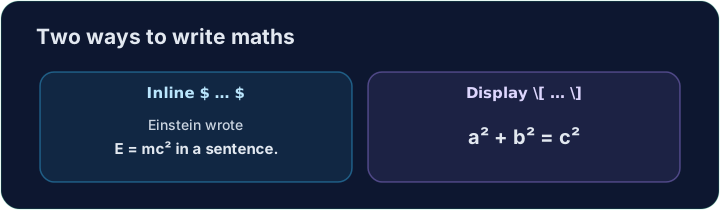
- This is what LaTeX is famous for. To write maths, switch into maths mode with dollar signs:
- Text between
$ ... $is typeset as maths, right inside your sentence. This is inline maths.
עברית
מצב מתמטי
- זה מה ש-Latex מפורסמת עליו. כדי לכתוב מתמטיקה, מעבר ל-מצב מתמטי עם סימני דולר:
The equation $E = mc^2$ changed physics.
- טקסט בין
$ ... $מודפס כמתמטיקה, בדיוק בתוך המשפט שלך. זו מתמטיקה בשורה.
English
Powers and indices
^raises a superscript (a power);_lowers a subscript:
- For more than one character, group them with braces:
$x^{10}$,$a_{i+1}$.
עברית
חזקות ואינדקסים
^מרים אקספוננט (חזקה);_מוריד אינדקס תחתון:
$x^2$, $a_1$, and $x^2 + y^2 = r^2$
- עבור יותר מאותו אחד, סביבו עם סוגריים:
$x^{10}$,$a_{i+1}$.
English
Big, centred equations
- For an important equation on its own line, use display maths
\[ ... \]:
- Now write your own inline formula in the task below.
עברית
משוואות גדולות וממוקדות במרכז
- למשוואה חשובה בשורה עצמאית, השתמש במתמטיקה בתצוגה
\[ ... \]:
\[ a^2 + b^2 = c^2 \]
- כעת כתוב נוסחה מקוונת משלך בתרגיל למטה.
English
Common mistakes
- Inline maths goes in
$...$; a missing closing$breaks everything after it. - Display maths uses
\[ ... \].
עברית
טעויות נפוצות
- מתמטיקה מקוונת נכתבת בתוך
$...$; חוסר בסוגר הסיום$ישבור את כל מה שאחריו. - מתמטיקה בתצוגה משתמשת ב
\[ ... \].
Replace the words with real maths. Write the area of a circle as an inline formula: $A = \pi r^2$. The $ ... $ turns on maths mode, \pi is π, and ^2 is the power. · החלף את המילים בביטויים מתמטיים אמיתיים. כתוב את שטח עיגול כ-נוסחה פנימית: $A = \pi r^2$. ה-$ ... $ מדליק מצב מתמטי, \pi הוא π, ו-^2 הוא החזקה.
Click Run to compile and preview the PDF. · לחץ הרצה כדי להרכיב ולהציג מראות את הקובץ.
For an important equation, give it its own line with display maths \[ ... \]. Write Pythagoras' theorem: \[ a^2 + b^2 = c^2 \]. · בעבור משוואה חשובה, תן לה שורה משלה עם מתמטיקה מוצגת \[ ... \]. כתוב את משפט פיתגורס: \[ a^2 + b^2 = c^2 \].
Click Run to compile and preview the PDF. · לחץ הרצה כדי להרכיב ולהציג מראות את הקובץ.