Sections and titles · פרקים וכותרות
This page needs a recent browser (with SharedArrayBuffer support). Please update Chrome, Edge, Firefox or Safari to the latest version. · עמוד זה דורש דפדפן עדכני (תומך ב-SharedArrayBuffer). אנא עדכן את Chrome, Edge, Firefox או Safari לגרסה העדכנית ביותר.
English
Organising with sections
- Real documents are split into sections so readers can follow them.
- The command is simple:
- LaTeX numbers it automatically (1, 2, 3 …) — you never count by hand.
עברית
ארגון באמצעות פרקים
- מסמכים אמיתיים מחולקים ל-פרקים כדי שהקוראים יוכלו לעקוב אחריו בקלות.
- הפקודה פשוטה:
\section{Introduction}
- ה-LaTeX ממספר אותו אוטומטית (1, 2, 3 …) — לעולם אין לספור ידנית.
English
Smaller pieces
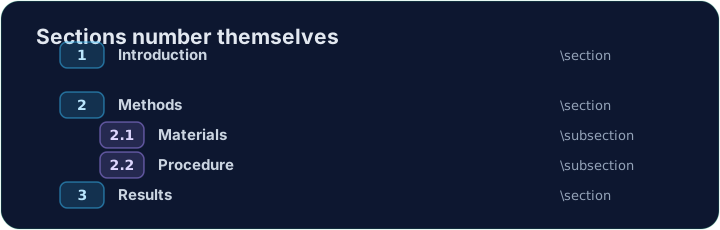
- Inside a section you can add subsections:
- These become 2.1, 2.2, and so on. Add or remove one and everything renumbers itself.
עברית
חלקים קטנים יותר
- בתוך פרק ניתן להוסיף אף-פרקים:
\section{Methods}
\subsection{Materials}
\subsection{Procedure}
- אלו יתמספרו כ-2.1, 2.2 וכן הלאה. הוסף או הסר אחד והכל ימוספר מחדש.
English
A title block
- A report usually starts with a title, an author, and a date.
- You declare them in the preamble, then print them with
\maketitle:
\maketitlemust go inside the body, as its first line.
עברית
בלוק הכותרות
- דוח מתחיל בדרך כלל בכותרת, שם מחבר ותאריך.
- מגדירים אותם בפרימבול, ומדפסים אותם עם
\maketitle:
\documentclass{article}
\title{My First Report}
\author{Pat Lee}
\begin{document}
\maketitle
...
\end{document}
\maketitleחייב להיות בתוך הגוף, כשורה הראשונה שלו.
English
Common mistakes
\section{...}numbers automatically; use\section*{...}for no number.\maketitleneeds\title{...}and\author{...}set first.
עברית
טעויות נפוצות
\section{...}מספר אוטומטית; השתמש ב\section*{...}כדי לא למספר.\maketitleזקוק ל\title{...}ול\author{...}שהוגדרו קודם.
Organise this report by adding a section heading. Put \section{Introduction} at the start of the body, then Run. Notice LaTeX numbers it for you. · ארגן דוח זה על ידי הוספת כותרת פרק. הוסף \section{Introduction} בהתחלת הגוף, ולאחר מכן לחץ על הפעל. שימו לב ש-Latex מספר את הפרק עבורך אוטומטית.
Click Run to compile and preview the PDF. · לחץ הרצה כדי להרכיב ולהציג מראות את הקובץ.
Give the document a title block. Add \title{...} and \author{...} in the preamble, then \maketitle as the first line of the body. · תן למסמך בלוק כותרת. הוסף \title{...} ו-\author{...} בפיואמבל, ולאחר מכן הוסף \maketitle בשורה הראשונה בגוף.
Click Run to compile and preview the PDF. · לחץ הרצה כדי להרכיב ולהציג מראות את הקובץ.