HTTPS, SSL/TLS and certificates · HTTPS, SSL/TLS ותעודות
The padlock in your browser
- When you see HTTPS and a padlock, your connection to the website is encrypted.
- The "S" stands for Secure. It uses a protocol called TLS (the modern version of SSL).
המנעול בדפדפן שלך
- כשאתה רואה HTTPS ומנעול, הקישור שלך לאתר האינטרנט מצופה.
- ה"S" מייצג Secure (בטוח). היא משתמשת בפרוטוקול הנקרא TLS (הגרסה המודרנית של SSL).
How the secure connection is set up
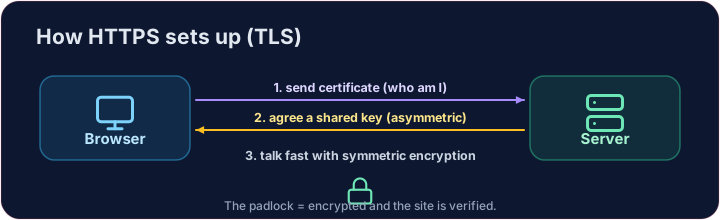
- TLS cleverly combines both kinds of encryption you have learned:
- It uses asymmetric encryption to safely agree on a shared secret key.
- Then it switches to fast symmetric encryption for the rest of the conversation.
- This "handshake" happens in a fraction of a second, before any page loads.
כיצד מתקיים הקישור הבטוח
- TLS משלב בצורה חכמה את שני סוגי ההצפנות שלמדנו:
- הוא משתמש בהצפנה לא סימטרית להסכמה בטוחה על מפתח משותף.
- לאחר מכן הוא מעبر להצפנה סימטרית מהירה למשך שאר השיחה.
- "המגע" הזה מתרחש בשבר שנייה, לפני טעינת הדף.
How do you know the site is real?
- Encryption is useless if you are talking to an impostor. That is what digital certificates solve.
- A website's certificate is issued by a trusted Certificate Authority (CA) and signed with the CA's key.
- Your browser checks the signature. If it is valid, you know the site is who it claims to be.
איך תודיעו שהאתר אמיתי?
- ההצפנה חסרת ערך אם אתם מדברים עם מחקה. את הבעיה הזו פותרים תעודות דיגיטליות.
- תעודת האתר מונפקת על ידי רשות הסמכה אמינה (Certificate Authority, CA) וחתימה על ידי המפתח של הרשות.
- הדפדפן שלך בודק את החתימה. אם היא תקינה, אתה יודע שהאתר הוא מי שהוא טוען שהוא.
Putting it together
- Certificate → proves who the site is. TLS → keeps the conversation secret.
- That tiny padlock means: encrypted, and verified. No padlock on a login page? Walk away.
Covers: IGCSE 5.3 (SSL), A-Level 17.1 (SSL/TLS, digital certificates).
חיבור הכל יחד
- תעודה → מוכיחה מי האתר. TLS → שומר על השיחה בסוד.
- סגור הקטן הזה אומר: הצפנה והתאמת זהות. אין סגור בדף הכניסה? לכו מהמקום.
כיסוי: IGCSE 5.3 (SSL), A-Level 17.1 (SSL/TLS, תעודות דיגיטליות).
Now you try
- First put the four handshake steps in the right order — the exam loves this sequence.
- Then be the browser: look at a certificate's details and decide whether to trust it.
כעת תנסו בעצמכם
- קודם כל, סדרו את ארבעת שלבי ההחלפה בסדר הנכון — המבחן אוהב סדר זה.
- לאחר מכן, התנהגו כדפדפן: צפו בפרטי התעודה והחליטו אם יש לסמוך עליה.
Common mistakes
- HTTPS encrypts the traffic; the certificate proves the site's identity.
- A certificate warning is a real warning — do not click through it.
טעויות נפוצות
- HTTPS מצפין את התנועה; התעודה מוכיחה את זהות האתר.
- אזהרת תעודה היא אזהרה אמיתית — אל תעברו אותה.
The TLS handshake · החילוף TLS
HTTPS sets up a secure channel before any data is sent. · HTTPS מקימה ערוץ בטוח לפני ששולחים כל נתון.
Put the TLS handshake in order. Fill the list order with the four steps, first to last: hello, certificate, key exchange, secure data. · סדר את מחובר ה-TLS. מלא את הרשימה order בארבע השלבים, מהראשון לאחרון: hello, certificate, key exchange, secure data.
Click Run to see the output here. · לחץ על הרץ כדי לראות את התוצא כאן.
Be the browser. Trust the certificate only if the name matches the site you asked for, the issuer is trusted, AND it has not expired (expires ≥ 2026). Print valid or invalid. · התנהג כמו דפדפן. הסתמך על התעודה רק אם ה-name מתאים ל-site שיבקשת, המנפיק אמין, AND היא לא פגה (expires ≥ 2026). הדפס valid או invalid.
Click Run to see the output here. · לחץ על הרץ כדי לראות את התוצא כאן.