Structs and typedef: . vs -> · מבנים ו-typedef: נקודה מול חץ
Grouping related data
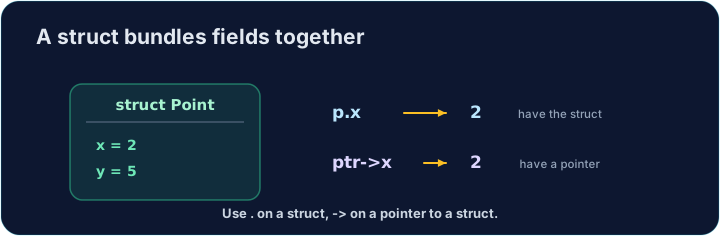
- A struct groups several values into one thing. A point has an
xand ay; a rectangle has awidthand aheight. - Each value inside is called a member (or field). They can have different types.
- Structs let you pass one tidy thing around instead of many loose variables.
קבוצת נתונים קשורים
- מבנה מקבץ מספר ערכים לדבר אחד. נקודה כוללת
xו-y; מלבן כוללwidthו-height. - כל ערך פנימי נקרא חבר (Member) או שדה. לחברים יכולים להיות סוגים שונים.
- Structs מאפשרים למסור חפץ מסודר אחד במקום משתנים רבים מפוזרים.
struct and typedef
- You define the shape once:
struct { int x; int y; }has twointmembers. typedefgives that shape a short name. Aftertypedef struct { int x; int y; } Point;, you can writePoint p;.- In these tasks, the
typedefis already written for you in the starter.
struct ו-typedef
- את המבנה מגדירים פעם אחת: ל-
struct { int x; int y; }יש שני חברי ⟨int⟩. typedefמעניק לצורה שם קצר. לאחרtypedef struct { int x; int y; } Point;, ניתן לכתובPoint p;.- במשימות אלו, ה-
typedefמוגדר כבר עבורך בקובץ ההתחלה (Starter).
Member access with .
- For a struct value, use a dot:
p.xis thexmember ofp. - You read it (
int a = p.x;) and write it (p.y = 5;) just like a normal variable. - A function can build a struct, fill its members, and
returnthe whole thing.
הגישה לחברים באמצעות .
- עבור ערך מבנה, השתמש בנקודה: ⟨
p.x⟩ הוא חבר ה-xשל ⟨p⟩. - קוראים אותו (
int a = p.x;) וכותבים בו (p.y = 5;) בדיוק כמו משתנה רגיל. - פונקציה יכולה לבנות struct, למלא את חבריו, ולהחזיר (
return) את כל החפץ.
Through a pointer with ->
- When you have a pointer to a struct, use an arrow:
p->xmeans "thexof whatppoints to". p->xis just shorthand for(*p).x. The arrow is easier to read.- Passing a
Point *lets a function change the caller's struct (like pass-by-pointer for one value).
דרך איشار pointer באמצעות ->
- כאשר יש לך pointer ל-struct, השתמש בחץ:
p->xפירושו "ה-xשל מה ש-pמצביע אליו". p->xהוא פשוט קיצור ל-(*p).x. החץ נוח יותר לקריאה.- העברת
Point *מאפשרת לפונקציה לשנות את מבנה הנתונים של הקורא (כמו מעבר בנרטיב למשתנה אחד).
#include <stdio.h>

typedef struct {
    int x;
    int y;
} Point;

int main(void) {
    Point p = {3, 4};
    Point *ptr = &p;
    ptr->x = 10;                    // changes p.x through the pointer
    printf("%d %d\n", p.x, p.y);    // 10 4
    return 0;
}
Common mistakes
- Use
.on a struct value and->on a struct pointer. typedeflets you drop the wordstructwhen declaring.
טעויות נפוצות
- השתמש ב-
.על ערך מבנה, וב-->על רמז למבנה. typedefמאפשר לך לוותר על המילהstructבעת ההצהרה.
Now you try
- Use
.on a struct value, and->when you have a pointer to a struct. - The
typedefis given in each starter. Do not write amain— the checker provides one.
כעת תנסו בעצמכם
- השתמש ב-
.על ערך מבנה, ו-->כאשר יש לך רמז למבנה. - ה-
typedefמוצע בכל תחילת קובץ. אל תכתובmain— הבוקר מספק אותו.
Complete Point make_point(int x, int y) so it builds a Point with those values and returns it (use . on the members). The typedef is given. Do not write a main. · השלם את Point make_point(int x, int y) כדי לבנות מבנה Point עם הערכים האלו ולהחזירו (השתמש ב-. על החברים). ה-typedef נתון. אל תכתוב פונקציית main.
Click Run to see the output here. · לחץ על הרץ כדי לראות את התוצא כאן.
Complete void move_point(Point *p, int dx, int dy) so it adds dx to the point's x and dy to its y, using ->. The typedef is given. Do not write a main. · השלם את void move_point(Point *p, int dx, int dy) כדי להוסיף dx ל-x של הנקודה ול-dy ל-y שלה, באמצעות ->. ה-typedef נתון. אל תכתוב פונקציית main.
Click Run to see the output here. · לחץ על הרץ כדי לראות את התוצא כאן.
Complete int rect_area(const Rect *r) so it returns width * height, reading the members with ->. The typedef is given. Do not write a main. · השלם את int rect_area(const Rect *r) כדי להחזיר width * height, קורא לחברים באמצעות ->. ה-typedef נתון. אל תכתוב פונקציית main.
Click Run to see the output here. · לחץ על הרץ כדי לראות את התוצא כאן.