Getting input · Obtenir une entrée
Ask the user with input
input()waits for the user to type a line and press Enter.- It gives back what they typed. Store it in a variable.
- Join two strings together with
+.
Demander à l'utilisateur avec input
input()attend que l'utilisateur tape une ligne et appuie sur Entrée.- Il renvoie ce qu'ils ont tapé. Stockez-le dans une variable.
- Jointez deux chaînes ensemble avec
+.
name = input()
print("Welcome, " + name)
When your program waits
- When you press Run, the program stops at
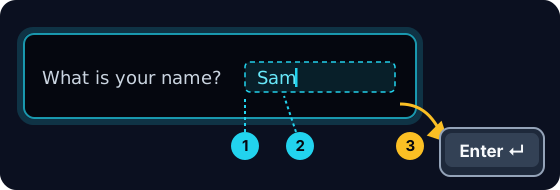
input()and waits for you. - A highlighted box appears under the code: type here, then press Enter.
- Click the box, type your answer and press Enter. Then the program continues.
Quand votre programme attend
- Lorsque vous appuyez sur Exécuter, le programme s'arrête à
input()et attend de vous. - Une boîte surlignée apparaît sous le code : tapez ici, puis appuyez sur Entrée.
- Cliquez sur la boîte, tapez votre réponse et appuyez sur Entrée. Ensuite, le programme continue.
input always gives a string
- Whatever the user types comes back as a string.
- Even if they type
5, you get the text"5", not the number. - So
"5" + "5"is"55"(joined text), not10.
input retourne toujours une chaîne
- Quoi que l'utilisateur tape, cela revient sous forme de chaîne.
- Même s'ils tapent
5, vous obtenez le texte"5", pas le nombre. - Donc
"5" + "5"est"55"(texte joint), pas10.
print("5" + "5") # 55 — joined text, not the number 10
Turn text into a number
int(...)turns text into a whole number:int("5")→5.float(...)turns text into a decimal:float("2.5")→2.5.- Convert first, then you can do maths.
Transformer du texte en nombre
int(...)transforme du texte en nombre entier :int("5")→5.float(...)transforme du texte en décimal :float("2.5")→2.5.- Convertissez d'abord, puis vous pouvez faire des maths.
age = int(input())
print(age + 1)
Common mistakes
input()always returns a string, so wrap it inint(...)before doing maths.- The text inside
input("...")is the prompt shown to the user.
Erreurs courantes
input()retourne toujours une chaîne, donc enveloppez-la dansint(...)avant de faire des maths.- Le texte à l'intérieur de
input("...")est le message affiché à l'utilisateur.
Now you try
- When you Run, type the input yourself in the box and press Enter.
- Check answer types the task's input for you, so just read it with
input(). - Each task needs only one
input().
À vous maintenant
- Lorsque vous Exécutez, tapez vous-même l'entrée dans la boîte et appuyez sur Entrée.
- Vérifier la réponse tape l'entrée de la tâche pour vous, alors lisez simplement avec
input(). - Chaque tâche nécessite seulement une
input().
Input → process → output · Entrée → traitement → sortie
Most programs follow one shape: get input, do something, show output. · La plupart des programmes suivent une forme : obtenir une entrée, faire quelque chose, afficher une sortie.
Read a name with input(), then print Hi, then the name then !. For the input Sam, the output should be Hi, Sam!. · Lisez un nom avec input(), puis affichez Hi, , ensuite le nom, puis !. Pour l'entrée Sam, la sortie doit être Hi, Sam!.
Click Run to see the output here. · Cliquez sur Exécuter pour voir le résultat ici.
Read a whole number with input(), convert it with int(...), then print the number plus 100. For input 7, the output should be 107. · Lisez un nombre entier avec input(), convertissez-le avec int(...), puis affichez le nombre plus 100. Pour l'entrée 7, la sortie devrait être 107.
Click Run to see the output here. · Cliquez sur Exécuter pour voir le résultat ici.
Read a whole number, convert it with int(...), then print its square (the number times itself). For input 5, the output should be 25. · Lisez un nombre entier, convertissez-le avec int(...), puis imprimez son carré (le nombre multiplié par lui-même). Pour l'entrée 5, la sortie devrait être 25.
Click Run to see the output here. · Cliquez sur Exécuter pour voir le résultat ici.
Read the width · largeur, then the height, each with int(input()). Print the area on one line and the perimeter on the next. For the inputs 3 and · et 5 the output is Area: 15 and · et Perimeter: 16. · Lisez la largeur, puis la hauteur, chacune avec int(input()). Affichez l'aire sur une ligne et le périmètre sur la suivante. Pour les entrées 3 et 5, la sortie est Area: 15 et Perimeter: 16.
Click Run to see the output here. · Cliquez sur Exécuter pour voir le résultat ici.