Wildcards · Joker (Wildcards)
This page needs a recent browser (with SharedArrayBuffer support). Please update Chrome, Edge, Firefox or Safari to the latest version. · Cette page nécessite un navigateur récent (avec support SharedArrayBuffer). Veuillez mettre à jour Chrome, Edge, Firefox ou Safari vers la dernière version.
English
One command, many files
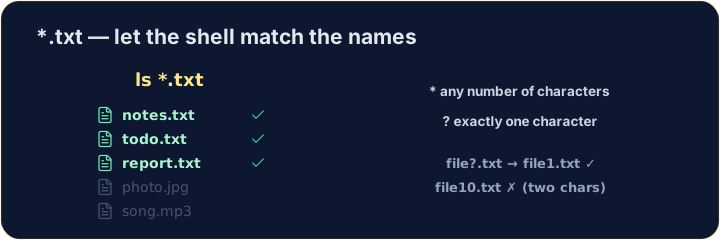
- A wildcard is a symbol that stands for "anything". The most common is
*. *.txtmeans "every name ending in.txt". The shell fills in the matches for you:
Français
Une commande, de nombreux fichiers
- Un caractère générique (wildcard) est un symbole qui signifie "n'importe quoi". Le plus courant est
*. *.txtsignifie "chaque nom se terminant par.txt". Le shell remplit les correspondances pour vous :
ls *.txt
English
The two main wildcards
*matches any number of characters (even none).?matches exactly one character.
- So
file?.txtmatchesfile1.txtandfileA.txt, but notfile10.txt.
Français
Les deux caractères génériques principaux
*correspond à n'importe quel nombre de caractères (voire zéro).?correspond à exactement un caractère.
ls file?.txt
file?.txtcorrespond àfile1.txtetfileA.txt, mais pas àfile10.txt.
English
Be careful with delete
- Wildcards are powerful — and that cuts both ways:
- That deletes every
.txtfile at once. Runls *.txtfirst to see exactly what will go.
Français
Faites attention lors de la suppression
- Les caractères génériques sont puissants — et cela coupe dans les deux sens :
rm *.txt
- Cela supprime tous les fichiers
.txtà la fois. Exécutezls *.txtd'abord pour voir exactement ce qui sera supprimé.
English
Common mistakes
*matches any text and?matches one character.- Quote a name that has spaces, or the shell splits it into two.
Français
Erreurs courantes
*correspond à n'importe quel texte et?correspond à un seul caractère.- Mettez entre guillemets un nom contenant des espaces, sinon le shell le divise en deux.
List only the .txt files using the * wildcard: ls *.txt. · Listez uniquement les fichiers .txt en utilisant le joker * : ls *.txt.
Delete · Supprimer all · tout the .txt files at once with rm *.txt. The check lists what is left. · Supprimez tout les fichiers .txt d'un coup avec rm *.txt. La vérification liste ce qui reste.