INPUT and data types · INPUT et types de données
This page needs a recent browser (with SharedArrayBuffer support). Please update Chrome, Edge, Firefox or Safari to the latest version. · Cette page nécessite un navigateur récent (avec support SharedArrayBuffer). Veuillez mettre à jour Chrome, Edge, Firefox ou Safari vers la dernière version.
English
INPUT reads what the user types
INPUTreads one line the user types and stores it in a variable.- Pair it with
OUTPUTto talk to the user.
Français
INPUT lit ce que l'utilisateur tape
INPUTlit une ligne tapée par l'utilisateur et la stocke dans une variable.- Associez-le à
OUTPUTpour dialoguer avec l'utilisateur.
INPUT Name
OUTPUT "Hello, ", Name
English
DECLARE the type so numbers work
- Text typed in is a string by default.
DECLAREa variable asINTEGER(orREAL) soINPUTreads a number.
Français
DECLARE le type pour que les nombres fonctionnent
- Le texte tapé est par défaut une chaîne.
DECLAREune variable commeINTEGER(ouREAL) afin queINPUTlise un nombre.
DECLARE Age : INTEGER
INPUT Age
OUTPUT Age + 1
English
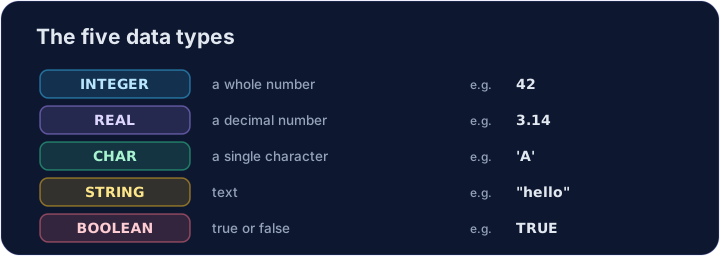
The five data types
- Every value has a type. The 2026–2028 syllabus uses five: INTEGER, REAL, CHAR, STRING and BOOLEAN.
Français
Les cinq types de données
- Chaque valeur a un type. Le programme 2026–2028 en utilise cinq : INTEGER, REAL, CHAR, STRING et BOOLEAN.
DECLARE Price : REAL
DECLARE Letter : CHAR
DECLARE Passed : BOOLEAN
Price ← 2.50
Letter ← 'A'
Passed ← TRUE
OUTPUT Price, " ", Letter, " ", Passed
English
Watch out
- Without
DECLARE ... : INTEGER,INPUTkeeps the value as a string, soAge + 1would fail. CHARholds one character in single quotes ('A');STRINGholds many in double quotes.
Français
Attention
- Sans
DECLARE ... : INTEGER,INPUTgarde la valeur comme une chaîne, doncAge + 1échouerait. CHARcontient un caractère entre guillemets simples ('A') ;STRINGen contient beaucoup entre guillemets doubles.
English
Common mistakes
INPUT xreads a value intox.- Choose the right type: INTEGER, REAL, STRING, BOOLEAN or CHAR.
Français
Erreurs courantes
INPUT xlit une valeur dansx.- Choisissez le bon type : INTEGER, REAL, STRING, BOOLEAN ou CHAR.
English
Now you try
- Each task reads one input with
INPUT. - Press Check answer to test it.
Français
À vous maintenant
- Chaque tâche lit une entrée avec
INPUT. - Appuyez sur Vérifier la réponse pour tester.
Read a name with INPUT, then output Hi, followed by the name. For input Sam, output Hi, Sam. · Lisez un nom avec INPUT, puis affichez Hi, suivi du nom. Pour l'entrée Sam, affichez Hi, Sam.
Click Run to see the output here. · Cliquez sur Exécuter pour voir le résultat ici.
DECLARE N as INTEGER, read it with INPUT, then output N + 1. For input 9, output 10. · DECLARE N en tant que INTEGER, lisez-le avec INPUT, puis affichez N + 1. Pour l'entrée 9, affichez 10.
Click Run to see the output here. · Cliquez sur Exécuter pour voir le résultat ici.
Read an INTEGER N, then output N doubled (times 2). For input 6, output 12. · Lisez un INTEGER N, puis sortez N doublé (multiplié par 2). Pour l'entrée 6, sortez 12.
Click Run to see the output here. · Cliquez sur Exécuter pour voir le résultat ici.