Performance, the fetch-execute cycle and interrupts · Rendimiento, el ciclo de búsqueda-ejecución e interrupciones
| English | Español |
|---|---|
| interrupt/ˈɪntərʌpt/ | interrupción |
| clock speed/klɒk spiːd/ | velocidad del reloj |
| fetch-execute cycle/fetʃ ˈeksɪkjuːt ˈsaɪkl/ | ciclo de búsqueda-ejecución |
| cores/kɔːz/ | núcleos |
| cache/kæʃ/ | cache |
| word size/wɜːd saɪz/ | tamaño de palabra |
| port/pɔːt/ | puerto |
| peripheral/pəˈrɪfərəl/ | periférico |
| register transfer notation/ˈredʒɪstə ˈtrænsfɜː nəʊˈteɪʃn/ | notación de transferencia de registros |
| stack/stæk/ | pila |
| interrupt service routine/ˈɪntərʌpt ˈsɜːvɪs ruːˈtiːn/ | rutina de servicio de interrupción |
| interrupt register/ˈɪntərʌpt ˈredʒɪstə/ | registro de interrupciones |
Why your laptop drops everything when you press a key
- A processor runs billions of cycles a second. If it had to stop and ask the keyboard "anything yet?" between instructions, it would waste most of them asking.
- Instead the keyboard sends an interrupt 中断. The processor finishes its current instruction, saves its place, deals with the key, and returns as if nothing had happened.
- That one mechanism is how a single processor appears to run your music, your browser and your typing at once.
- This lesson covers what makes a processor fast, how it connects to devices, exactly how it runs one instruction, and how an interrupt cuts in.
¿Por qué tu ordenador se detiene todo al pulsar una tecla
- Un procesador ejecuta miles de millones de ciclos por segundo. Si tuviera que detenerse y preguntar al teclado "¿algo nuevo?" entre instrucciones, desperdiciaría la mayoría de esos ciclos haciendo esa pregunta.
- En cambio, el teclado envía una interrupción 中断. El procesador termina su instrucción actual, guarda su posición, gestiona la tecla y vuelve a continuar como si nada hubiera pasado.
- Ese único mecanismo es lo que hace que un solo procesador parezca ejecutar tu música, tu navegador y tu escritura al mismo tiempo.
- Esta lección cubre qué hace rápido a un procesador, cómo se conecta con los dispositivos, exactamente cómo ejecuta una instrucción y cómo se interrumpe el flujo normal.
What affects performance
- Clock speed 时钟频率: more fetch-execute cycles a second, so more instructions a second, until heat sets the limit.
- Number of cores 核心: each core fetches and executes its own instruction at the same time, so several programs or threads run in parallel. A program must be written to use them, so doubling the cores does not double the speed.
- Bus width: a wider data bus moves more bits per transfer, so fewer transfers; a wider address bus reaches more memory.
- Cache 高速缓存: a small, fast memory next to the processor holding the instructions and data used most recently, so fewer slow trips to RAM. Word size 字长, the amount of RAM and the storage type help too.
Factores que afectan al rendimiento
- Velocidad del reloj 时钟频率: más ciclos de búsqueda-ejecución por segundo, por lo tanto, más instrucciones ejecutadas por segundo, hasta que el calor establece el límite.
- Número de núcleos 核心: cada núcleo busca y ejecuta sus propias instrucciones al mismo tiempo, permitiendo que varios programas o hilos corran en paralelo. Un programa debe estar escrito para usarlos, por lo que duplicar los núcleos no duplica la velocidad.
- Ancho del bus: un bus de datos más ancho mueve más bits por transferencia, reduciendo el número de transferencias; un bus de direcciones más ancho permite acceder a más memoria.
- Caché 高速缓存: una pequeña y rápida memoria junto al procesador que almacena las instrucciones y datos usados más recientemente, reduciendo los lentos viajes a la RAM. El tamaño de palabra 字长, la cantidad de RAM y el tipo de almacenamiento también ayudan.
Select all · todos the factors that affect CPU performance. · Selecciona todos los factores que afectan el rendimiento de la CPU.
Clock speed, cores and cache (plus word size, RAM, storage and bus width) all affect performance. The case colour does not. · La velocidad del reloj, los núcleos y la caché (más el tamaño de palabra, RAM, almacenamiento y ancho del bus) todos afectan el rendimiento. El color de la carcasa no.
A multi-core CPU is especially helpful for: · Una CPU de múltiples núcleos es especialmente útil para:
Extra cores run tasks in parallel. A purely single-threaded job benefits more from higher per-core speed. · Los núcleos adicionales ejecutan tareas en paralelo. Un trabajo puramente de un solo hilo se beneficia más de una velocidad mayor por núcleo.
____ memory is a small, fast store next to the processor that holds recently used instructions and data, so fewer slow trips to RAM are needed. · ____ memoria es un almacén pequeño y rápido junto al procesador que mantiene las instrucciones y datos usados recientemente, para que se necesiten menos viajes lentos a la RAM.
More cache means more of the working set sits next to the processor, which is the reason it appears in every performance comparison. · Más caché significa que más del conjunto de trabajo se encuentra junto al procesador, que es la razón por la que aparece en cada comparación de rendimiento.
Worked example: "explain why the new computer is faster"
- Compare the two specifications line by line, each with its reason.
- 3.8 GHz against 2.4 GHz: more cycles a second, so more instructions executed a second.
- 8 cores against 4: twice as many instructions can be fetched and executed at the same time, for software that uses them.
- 16 MB of cache against 4 MB: more of the working set is held next to the processor, so fewer waits for RAM. Each line is two marks: the factor and its consequence.
Ejemplo resuelto: "explica por qué el ordenador nuevo es más rápido"
- Compara las dos especificaciones línea por línea, incluyendo la razón correspondiente.
- 3.8 GHz frente a 2.4 GHz: más ciclos por segundo, por lo tanto, más instrucciones ejecutadas por segundo.
- 8 núcleos frente a 4: el doble de instrucciones pueden ser buscadas y ejecutadas simultáneamente, para software que las utilice.
- 16 MB de caché frente a 4 MB: una mayor parte del conjunto de trabajo se mantiene junto al procesador, reduciendo las esperas por la RAM. Cada línea vale dos puntos: el factor y su consecuencia.
Ports
- A port 端口 is a physical socket that connects a peripheral 外围设备.
- USB (Universal Serial Bus) is general-purpose: keyboards, drives, phones. It is plug-and-play: the computer detects the device, identifies it, loads its driver and can power it, with no restart.
- HDMI (High Definition Multimedia Interface) carries digital video and audio down one cable, so nothing is converted to analogue and the picture is not degraded. VGA (Video Graphics Array) is the older analogue video socket.
Puertos
- Un puerto 端口 es un conector físico que une un periférico 外围设备.
- USB (Bus Serial Universal) es de uso general: teclados, unidades de almacenamiento, teléfonos. Es plug-and-play (conectar y usar): el ordenador detecta el dispositivo, lo identifica, carga su controlador y puede alimentarlo, sin necesidad de reiniciar.
- HDMI (Interfaz Multimedia de Alta Definición) transmite video digital y audio por un solo cable, por lo que nada se convierte a analógico y la imagen no se degrada. VGA (Video Graphics Array) es el conector de video analógico más antiguo.
Match each port to what it carries. · Empareja cada puerto con lo que transporta.
Different signals, different sockets: an HDMI cable will not fit a USB port. · Diferentes señales, diferentes enchufes: un cable HDMI no entrará en un puerto USB.
The fetch stage
- Once per instruction the processor runs the fetch-execute cycle 取指-执行周期. Fetch comes first, and the exam wants it in register transfer notation 寄存器传送记法.
- A read signal travels on the control bus, the address on the address bus, and the instruction comes back on the data bus. The PC is incremented straight after its address is copied, so that a jump executed later can still overwrite it.
PC → MAR → memory → MDR → CIR, with the PC incremented on the way
Etapa de búsqueda (Fetch)
- Una vez por instrucción, el procesador ejecuta el ciclo de búsqueda-ejecución 取指-执行周期. La búsqueda viene primero, y el examen exige describirla en notación de transferencia de registros 寄存器传送记法.
MAR ← [PC]          the address of the next instruction goes to the MAR
PC  ← [PC] + 1      the PC now points to the following instruction
MDR ← [[MAR]]       the instruction at that address is read into the MDR
CIR ← [MDR]         the instruction is copied into the CIR for decoding
- Una señal de lectura viaja por el bus de control, la dirección por el bus de direcciones, y la instrucción regresa por el bus de datos. El PC se incrementa inmediatamente después de copiar su dirección, para que un salto ejecutado más tarde pueda sobrescribirla.
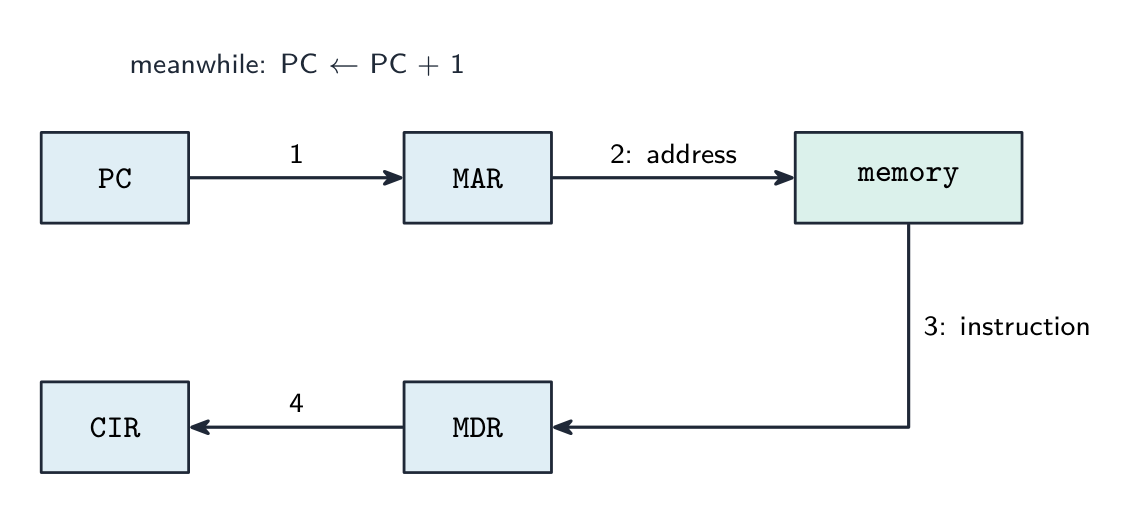
PC → MAR → memoria → MDR → CIR, con el PC incrementado en el camino
Put the fetch steps in the correct order. · Pon los pasos de búsqueda en el orden correcto.
PC → MAR, increment PC, read signal, then the instruction travels MDR → CIR ready to decode. · PC → MAR, incrementa PC, señal de lectura, luego la instrucción viaja MDR → CIR lista para decodificar.
The PC is incremented during the fetch stage so the next cycle fetches the following instruction. · El PC se incrementa durante la etapa de búsqueda para que el siguiente ciclo busque la siguiente instrucción.
Incrementing the PC early means it already points at the next instruction by the time this one executes (unless a jump changes it). · Incrementar el PC temprano significa que ya apunta a la siguiente instrucción para cuando esta se ejecute (a menos que un salto lo cambie).
Decode, execute, repeat
- Decode: the control unit works out from the instruction in the CIR which operation it is and where its operands are.
- Execute: arithmetic and logic go to the ALU with the result in the ACC; a load or store moves data between memory and a register; a jump writes a new address into the PC.
- Then the cycle repeats from
MAR ← [PC]. At the end of every cycle the processor also checks whether an interrupt is waiting.
One LOAD and one ADD walk the registers: fetch, decode, execute, repeat
Decodificar, ejecutar, repetir
- Decodificar: la unidad de control determina a partir de la instrucción en el CIR qué operación es y dónde están sus operandos.
- Ejecutar: la aritmética y lógica van a la ALU con el resultado en el ACU; una carga o almacenamiento mueve datos entre la memoria y un registro; un salto escribe una nueva dirección en el PC.
- Luego el ciclo se repite desde
MAR ← [PC]. Al final de cada ciclo, el procesador también verifica si hay una interrupción pendiente.
Una LOAD y una ADD recorren los registros: búsqueda, decodificación, ejecución, repetición
The fetch-execute cycle · El ciclo de búsqueda-ejecución
Tap round the loop the CPU repeats billions of times a second. Watch how fetch uses the PC/MAR/MDR/CIR registers, then decode and execute act on what was fetched. · Toca alrededor del bucle que la CPU repite miles de millones de veces por segundo. Observa cómo la búsqueda utiliza los registros PC/MAR/MDR/CIR, luego decodifica y ejecuta actúa sobre lo que se buscó.
Worked example: executing two instructions in notation
- Execute
LDD 200(load the contents of address 200 into the ACC):MAR ← 200, thenMDR ← [[MAR]], thenACC ← [MDR]. - Execute
ADD 201:MAR ← 201,MDR ← [[MAR]],ACC ← [ACC] + [MDR]. - Execute
STO 202:MAR ← 202,MDR ← [ACC],[[MAR]] ← [MDR]. - Every line moves one value between two places. The double brackets always mean "the memory location whose address is in the MAR".
Ejemplo resuelto: ejecutar dos instrucciones en notación
- Ejecutar
LDD 200(cargar el contenido de la dirección 200 en el ACU):MAR ← 200, luegoMDR ← [[MAR]], luegoACC ← [MDR]. - Ejecutar
ADD 201:MAR ← 201,MDR ← [[MAR]],ACC ← [ACC] + [MDR]. - Ejecutar
STO 202:MAR ← 202,MDR ← [ACC],[[MAR]] ← [MDR]. - Cada línea mueve un valor entre dos lugares. Los corchetes dobles siempre significan "la ubicación de memoria cuya dirección está en el MAR".
Put the register transfers that execute LDD 200 in order. · Pon las transferencias de registro que ejecutan LDD 200 en orden.
Address to the MAR, contents of that address to the MDR, then into the accumulator. · Dirección al MAR, contenido de esa dirección al MDR, luego al acumulador.
Interrupts
- An interrupt is a signal that pauses the normal cycle so the processor can deal with an urgent event.
- Causes: a hardware device (a key pressed, a printer buffer empty, a network packet arriving), a software fault (division by zero, an illegal instruction, arithmetic overflow), the operating system's timer marking the end of a time slice, a power-failure warning.
- Interrupts let the system respond promptly without the processor constantly checking devices, and they are how the operating system multitasks.
The cycle, with the interrupt check at the end of each pass
Interrupciones
- Una interrupción es una señal que pausa el ciclo normal para que el procesador pueda gestionar un evento urgente.
- Causas: un dispositivo de hardware (una tecla presionada, un buffer de impresora vacío, la llegada de un paquete de red), un error de software (división por cero, una instrucción ilegal, desbordamiento aritmético), el temporizador del sistema operativo marcando el final de una partición de tiempo, una advertencia de fallo de energía.
- Las interrupciones permiten que el sistema responda rápidamente sin que el procesador revise constantemente los dispositivos, y son el mecanismo mediante el cual el sistema operativo gestiona múltiples tareas.
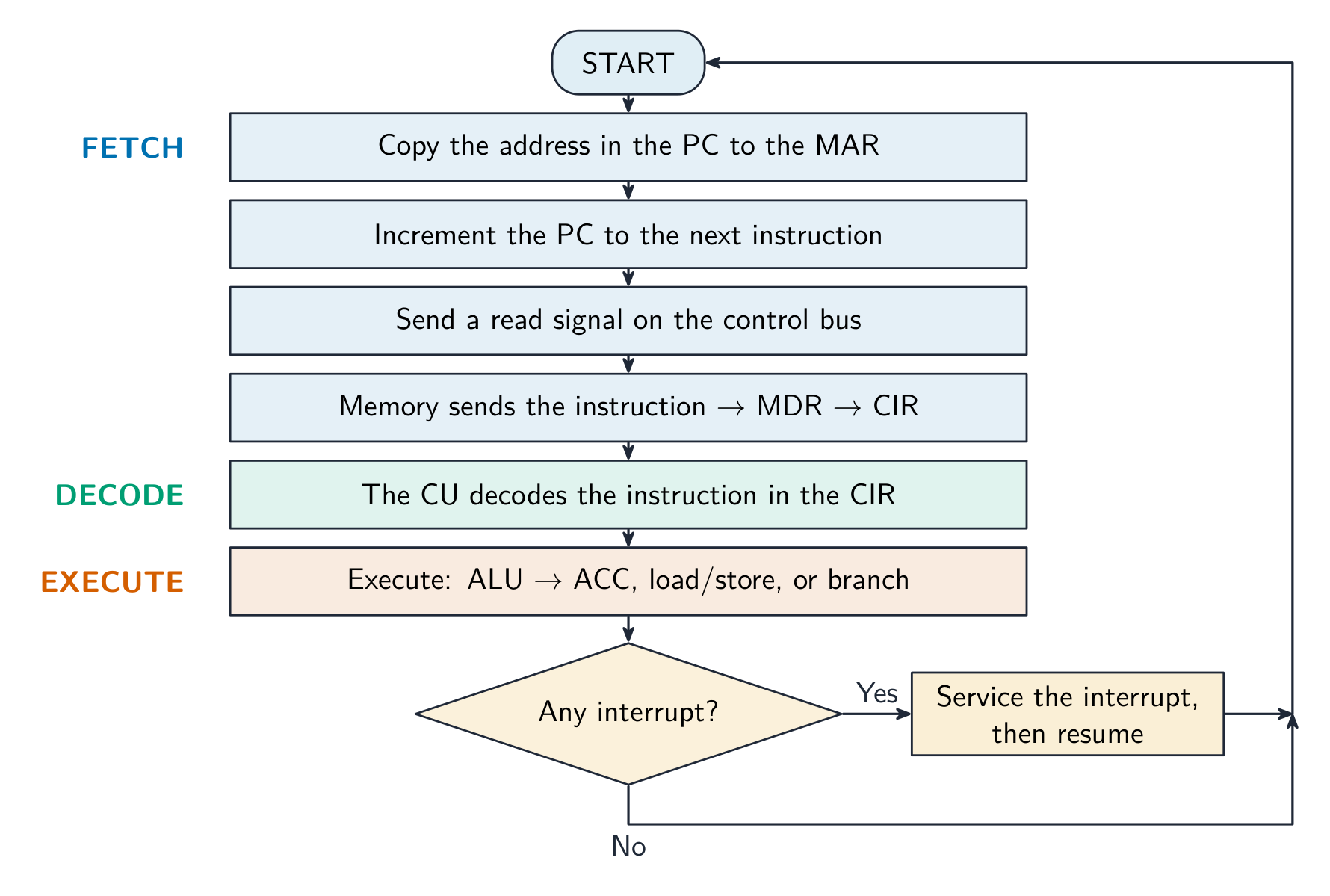
El ciclo, con la verificación de interrupciones al final de cada pasada
An interrupt is: · Una interrupción es:
An interrupt temporarily pauses the fetch-execute cycle so the CPU can service an urgent event, then resumes. · Una interrupción pausa temporalmente el ciclo de búsqueda-ejecución para que la CPU pueda atender un evento urgente, luego retoma.
Which of these can cause an interrupt? Select all · todos that apply. · ¿Cuál de estos puede causar una interrupción? Selecciona todos los que apliquen.
Hardware events, software faults and the OS timer all raise interrupts. A loop ending is ordinary program flow handled by a jump, not an interrupt. · Los eventos de hardware, fallos de software y el temporizador del SO generan interrupciones. Que termine un bucle es un flujo de programa ordinario manejado por un salto, no una interrupción.
Handling an interrupt
- Finish the current instruction. Save the state: the contents of the PC and the other registers go onto the stack 栈.
- Load the address of the interrupt service routine 中断服务程序 (ISR) into the PC and run it. The ISR handles the event.
- Restore the saved state from the stack and carry on with the interrupted program exactly where it left off.
Save, service, restore, resume
Manejo de una interrupción
- Terminar la instrucción actual. Guardar el estado: el contenido del PC y de los demás registros se coloca en la pila 栈.
- Cargar la dirección de la rutina de servicio de interrupción 中断服务程序 (ISR) en el PC y ejecutarla. La ISR maneja el evento.
- Restaurar el estado guardado desde la pila y continuar con el programa interrumpido exactamente donde quedó.
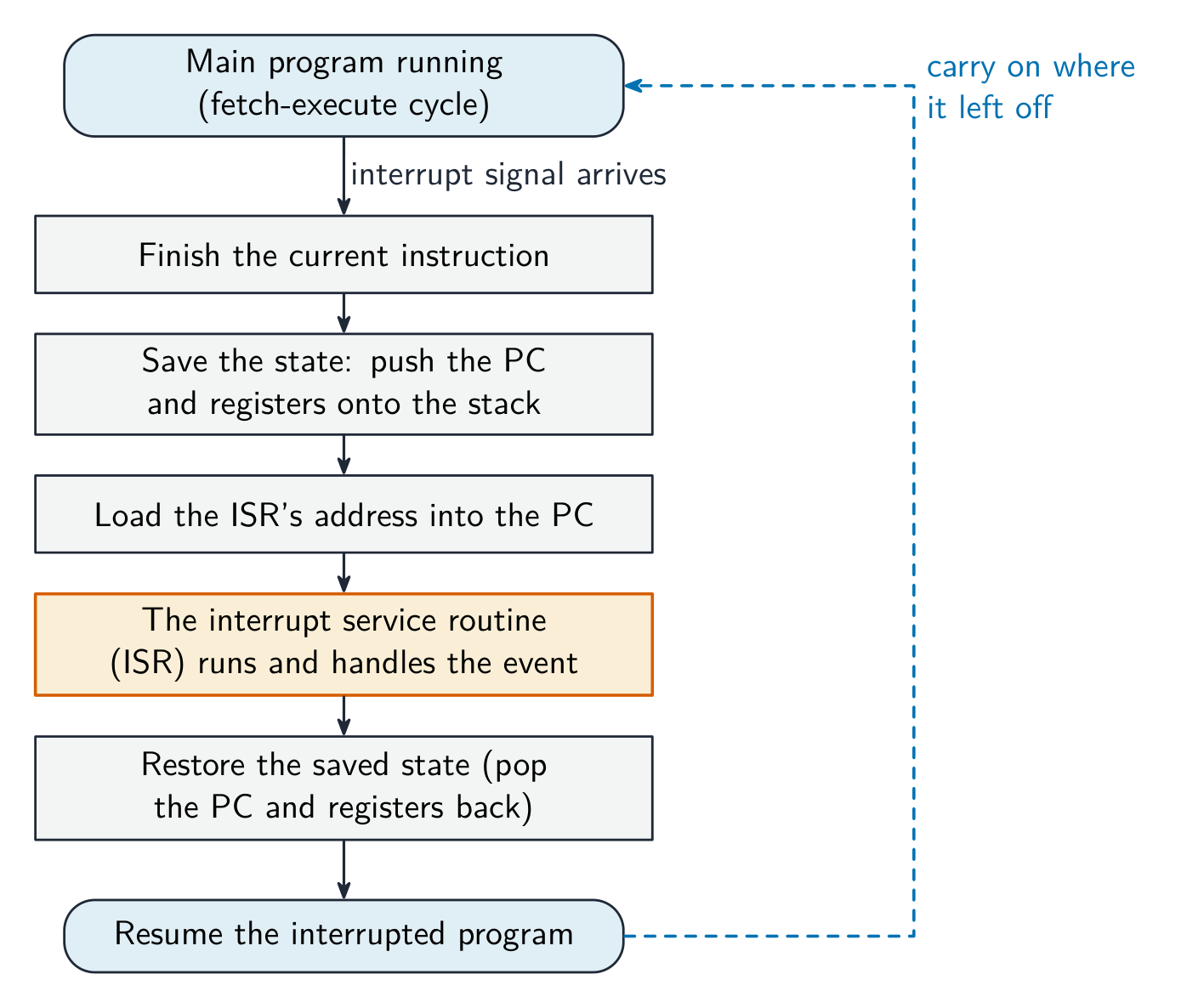
Guardar, servir, restaurar, reanudar
When an interrupt occurs, the CPU first finishes the current instruction, then: · Cuando ocurre una interrupción, la CPU primero termina la instrucción actual, luego:
It saves the PC and registers, runs the interrupt service routine, then restores the state and continues where it left off. · Guarda el PC y los registros, ejecuta la rutina de servicio de interrupciones, luego restaura el estado y continúa donde dejó.
Worked example: the four-mark interrupt answer
- Explain how an interrupt from an input device is detected and handled in the fetch-execute cycle.
- The device sends an interrupt signal that sets a flag in the interrupt register 中断寄存器. The processor checks that register at the end of every cycle, after the current instruction has finished executing.
- If a flag is set and the interrupt has a higher priority than the current task, the PC and the other registers are saved on the stack. The address of the ISR is loaded into the PC and the routine runs.
- When it finishes, the registers are restored from the stack and the interrupted program resumes. Four points, in that order.
Ejemplo resuelto: la respuesta de cuatro puntos sobre interrupciones
- Explica cómo se detecta y gestiona una interrupción de un dispositivo de entrada en el ciclo de búsqueda-ejecución.
- El dispositivo envía una señal de interrupción que activa una bandera en el registro de interrupciones 中断寄存器. El procesador revisa ese registro al final de cada ciclo, después de que la instrucción actual haya terminado de ejecutarse.
- Si hay una bandera activada y la interrupción tiene mayor prioridad que la tarea actual, el PC y los otros registros se guardan en la pila. Se carga la dirección de la ISR en el PC y se ejecuta la rutina.
- Cuando termina, los registros se restauran desde la pila y el programa interrumpido reanuda. Cuatro puntos, en ese orden.
The processor checks for interrupts at the end of every fetch-execute cycle, after the current instruction has finished. · El procesador verifica las interrupciones al final de cada ciclo de búsqueda-ejecución, después de que la instrucción actual ha terminado.
That timing is what lets the state be saved cleanly: no instruction is ever left half done. · Ese momento es lo que permite que el estado se guarde limpiamente: ninguna instrucción queda nunca a medias.
Marks that slip away
- The PC is incremented during the fetch, not after the execute. Put
PC ← [PC] + 1second, straight afterMAR ← [PC]. - Interrupts are checked at the end of a cycle, never in the middle of an instruction.
- The state goes onto the stack and comes back from it. "The CPU stops" or "the program is lost" is wrong: it resumes exactly where it was.
- More cores do not double the speed; the software has to use them. Say so when comparing specifications.
Puntos que se escapan
- El PC se incrementa durante la búsqueda, no después de la ejecución. Coloca
PC ← [PC] + 1en segundo lugar, justo después deMAR ← [PC]. - Las interrupciones se verifican al final de un ciclo, nunca en medio de una instrucción.
- El estado se coloca en la pila y se recupera de ella. Decir "la CPU se detiene" o "el programa se pierde" es incorrecto: reanuda exactamente donde estaba.
- Más núcleos no duplican la velocidad; el software debe utilizarlos. Menciónalo al comparar especificaciones.
You've got it
- performance: clock speed, cores, bus width, cache (plus word size, RAM, storage), each with its consequence
- ports: USB general-purpose and plug-and-play, HDMI digital video and audio, VGA analogue video
- fetch:
MAR ← [PC],PC ← [PC] + 1,MDR ← [[MAR]],CIR ← [MDR]; then decode, execute, repeat - an interrupt is checked at the end of each cycle: save state on the stack, run the ISR, restore, resume
Ya lo tienes
- rendimiento: velocidad del reloj, núcleos, ancho del bus, caché (más tamaño de palabra, RAM, almacenamiento), cada uno con su consecuencia
- puertos: USB de uso general y plug-and-play, HDMI de video y audio digital, VGA de video analógico
- búsqueda:
MAR ← [PC],PC ← [PC] + 1,MDR ← [[MAR]],CIR ← [MDR]; luego decodificar, ejecutar, repetir - una interrupción se verifica al final de cada ciclo: guardar estado en la pila, ejecutar la ISR, restaurar, reanudar