Getting input · Obtener entrada
Ask the user with input
input()waits for the user to type a line and press Enter.- It gives back what they typed. Store it in a variable.
- Join two strings together with
+.
Pide al usuario con input
input()espera a que el usuario escriba una línea y presione Enter.- Devuelve lo que escribió. Guárdalo en una variable.
- Une dos cadenas de texto con
+.
name = input()
print("Welcome, " + name)
When your program waits
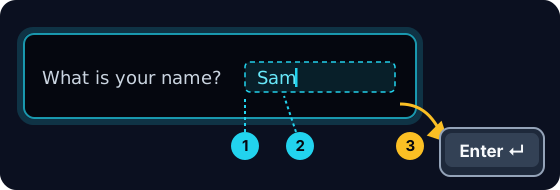
- When you press Run, the program stops at
input()and waits for you. - A highlighted box appears under the code: type here, then press Enter.
- Click the box, type your answer and press Enter. Then the program continues.
Cuando tu programa espera
- Al pulsar Ejecutar, el programa se detiene en
input()y espera por ti. - Aparece un cuadro destacado debajo del código: escribe aquí, luego presiona Enter.
- Haz clic en el cuadro, escribe tu respuesta y pulsa Enter. Entonces el programa continúa.
input always gives a string
- Whatever the user types comes back as a string.
- Even if they type
5, you get the text"5", not the number. - So
"5" + "5"is"55"(joined text), not10.
input siempre devuelve una cadena
- Lo que el usuario escriba volverá como una cadena (string).
- Incluso si escriben
5, obtendrás el texto"5", no el número. - Por eso
"5" + "5"es"55"(texto unido), no10.
print("5" + "5") # 55 — joined text, not the number 10
Turn text into a number
int(...)turns text into a whole number:int("5")→5.float(...)turns text into a decimal:float("2.5")→2.5.- Convert first, then you can do maths.
Convertir texto a número
int(...)convierte texto a número entero:int("5")→5.float(...)convierte texto a decimal:float("2.5")→2.5.- Convierte primero, luego puedes hacer matemáticas.
age = int(input())
print(age + 1)
Common mistakes
input()always returns a string, so wrap it inint(...)before doing maths.- The text inside
input("...")is the prompt shown to the user.
Errores comunes
input()siempre devuelve una cadena, así que envuélvelo enint(...)antes de hacer matemáticas.- El texto dentro de
input("...")es el mensaje que se muestra al usuario.
Now you try
- When you Run, type the input yourself in the box and press Enter.
- Check answer types the task's input for you, so just read it with
input(). - Each task needs only one
input().
Ahora tú prueban
- Cuando Ejecutes, escribe la entrada tú mismo en el cuadro y pulsa Enter.
- Comprobar respuesta escribe la entrada de la tarea por ti, así que solo léela con
input(). - Cada tarea necesita solo una
input().
Input → process → output · Entrada → proceso → salida
Most programs follow one shape: get input, do something, show output. · La mayoría de los programas siguen una estructura: obtener entrada, hacer algo, mostrar salida.
Read a name with input(), then print Hi, then the name then !. For the input Sam, the output should be Hi, Sam!. · Leer un nombre con input(), luego imprimir Hi, seguido del nombre y luego !. Para la entrada Sam, la salida debe ser Hi, Sam!.
Click Run to see the output here. · Haz clic en Ejecutar para ver la salida aquí.
Read a whole number with input(), convert it with int(...), then print the number plus 100. For input 7, the output should be 107. · Leer un número entero con input(), convertirlo con int(...), luego imprimir el número más 100. Para la entrada 7, la salida debe ser 107.
Click Run to see the output here. · Haz clic en Ejecutar para ver la salida aquí.
Read a whole number, convert it with int(...), then print its square (the number times itself). For input 5, the output should be 25. · Leer un número entero, convertirlo con int(...), luego imprimir su cuadrado (el número multiplicado por sí mismo). Para la entrada 5, la salida debe ser 25.
Click Run to see the output here. · Haz clic en Ejecutar para ver la salida aquí.
Read the width, then the height, each with int(input()). Print the area on one line and the perimeter on the next. For the inputs 3 and · y 5 the output is Area: 15 and · y Perimeter: 16. · Leer el ancho, luego la altura, cada uno con int(input()). Imprimir el área en una línea y el perímetro en la siguiente. Para las entradas 3 y 5, la salida es Area: 15 y Perimeter: 16.
Click Run to see the output here. · Haz clic en Ejecutar para ver la salida aquí.