Wildcards · Comodines
This page needs a recent browser (with SharedArrayBuffer support). Please update Chrome, Edge, Firefox or Safari to the latest version. · Esta página necesita un navegador reciente (con soporte para SharedArrayBuffer). Por favor, actualiza Chrome, Edge, Firefox o Safari a la última versión.
English
One command, many files
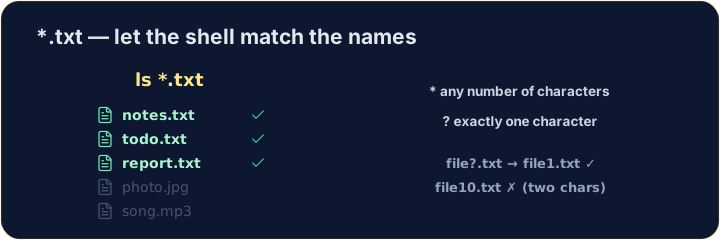
- A wildcard is a symbol that stands for "anything". The most common is
*. *.txtmeans "every name ending in.txt". The shell fills in the matches for you:
Español
Un comando, muchos archivos
- Un comodín es un símbolo que significa "cualquier cosa". El más común es
*. *.txtsignifica "todo nombre que termine en.txt". El shell rellena las coincidencias por ti:
ls *.txt
English
The two main wildcards
*matches any number of characters (even none).?matches exactly one character.
- So
file?.txtmatchesfile1.txtandfileA.txt, but notfile10.txt.
Español
Los dos comodines principales
*coincide con cualquier cantidad de caracteres (incluso ninguno).?coincide con exactamente un carácter.
ls file?.txt
- Por lo tanto,
file?.txtcoincide confile1.txtyfileA.txt, pero no confile10.txt.
English
Be careful with delete
- Wildcards are powerful — and that cuts both ways:
- That deletes every
.txtfile at once. Runls *.txtfirst to see exactly what will go.
Español
Ten cuidado al eliminar
- Los comodines son poderosos — y eso tiene dos caras:
rm *.txt
- Eso elimina todos los archivos
.txta la vez. Ejecuta primerols *.txtpara ver exactamente qué se va a borrar.
English
Common mistakes
*matches any text and?matches one character.- Quote a name that has spaces, or the shell splits it into two.
Español
Errores comunes
*coincide con cualquier texto y?coincide con un solo carácter.- Encierra entre comillas un nombre que tenga espacios, o el shell lo dividirá en dos.
List only the .txt files using the * wildcard: ls *.txt. · Liste solo los archivos .txt usando el comodín *: ls *.txt.
Delete · Eliminar all · todos the .txt files at once with rm *.txt. The check lists what is left. · Elimine todos los archivos .txt de una vez con rm *.txt. La verificación lista lo que queda.