Aligning equations · Alinear ecuaciones
This page needs a recent browser (with SharedArrayBuffer support). Please update Chrome, Edge, Firefox or Safari to the latest version. · Esta página necesita un navegador reciente (con soporte para SharedArrayBuffer). Por favor, actualiza Chrome, Edge, Firefox o Safari a la última versión.
English
Lining equations up
- When you show working, readers like the
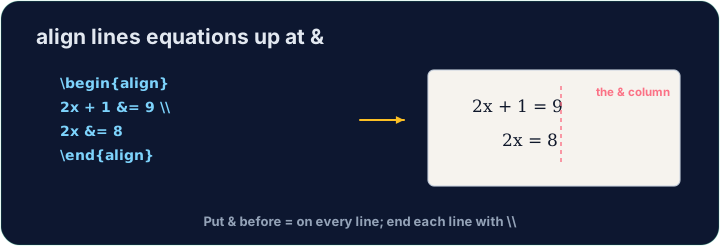
=signs to line up. Thealign*environment does this:
- The
&marks where to align (just before each=), and\\ends each line.
Español
Alinear ecuaciones
- Cuando muestres el procedimiento, a los lectores les gusta que los signos
=estén alineados. El entornoalign*hace esto:
\begin{align*}
  y &= 2(x + 3) \\
  y &= 2x + 6
\end{align*}
- El símbolo
&marca dónde alinear (justo antes de cada=), y\\finaliza cada línea.
English
Numbered or not
align*(with the star) gives no equation numbers.- Drop the star —
align— and LaTeX numbers each line(1),(2), … for you to refer to.
Español
Numeradas o no
align*(con el asterisco) no asigna números de ecuación.- Elimina el asterisco — usa
align— y LaTeX numerará automáticamente cada línea(1),(2), … para que puedas referenciarlas.
English
Matrices
amsmathalso gives matrices.bmatrixdraws square brackets:
- Again
&separates columns and\\separates rows — the same idea as alignment.
Español
Matrices
amsmathtambién proporciona matrices.bmatrixdibuja corchetes cuadrados:
\[
  \begin{bmatrix} 1 & 2 \\ 3 & 4 \end{bmatrix}
\]
- Nuevamente,
&separa columnas y\\separa filas; es la misma idea que en la alineación.
English
Common mistakes
- In
align, line up on&and end each line with\\. - Use
align*when you do not want equation numbers.
Español
Errores comunes
- En
align, alinea sobre&y termina cada línea con\\. - Usa
align*cuando no desees números de ecuación.
Show the two steps lined up at the = sign. Put them in an align* environment, with & just before each = and · y \\ between the lines. · Muestra los dos pasos alineados en el signo =. Colócalos en un entorno align*, con & justo antes de cada = y \\ entre las líneas.
Click Run to compile and preview the PDF. · Haz clic en Ejecutar para compilar y previsualizar el PDF.
Draw a 2×2 matrix with bmatrix (square brackets). Separate columns with & and rows with \\, e.g. \begin{bmatrix} 1 & 2 \\ 3 & 4 \end{bmatrix}. · Dibuja una matriz 2×2 con bmatrix (corchetes cuadrados). Separa columnas con & y filas con \\, p. ej. \begin{bmatrix} 1 & 2 \\ 3 & 4 \end{bmatrix}.
Click Run to compile and preview the PDF. · Haz clic en Ejecutar para compilar y previsualizar el PDF.