Bold, italic and emphasis · Negrita, cursiva y énfasis
This page needs a recent browser (with SharedArrayBuffer support). Please update Chrome, Edge, Firefox or Safari to the latest version. · Esta página necesita un navegador reciente (con soporte para SharedArrayBuffer). Por favor, actualiza Chrome, Edge, Firefox o Safari a la última versión.
English
Styling words
- To change how words look, you wrap them in a command:
\textbf= bold,\textit= italic,\texttt=code-like.
Español
Dar estilo a las palabras
- Para cambiar el aspecto de las palabras, las envuelves en un comando:
\textbf{bold} and \textit{italic} and \texttt{typewriter}
\textbf= negrita,\textit= cursiva,\texttt=code-like.
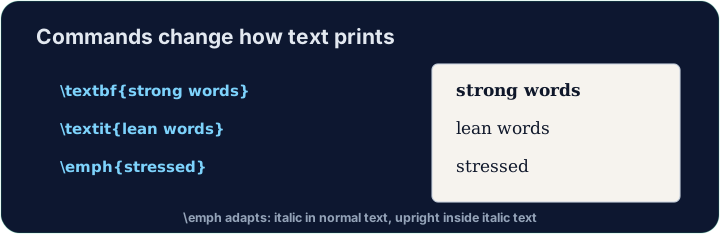
English
Emphasis the smart way
\emph{...}means "emphasise this" — usually italic, but it flips smartly inside italic text.- Prefer
\emphfor meaning, and\textitwhen you specifically want italic shapes.
Español
Énfasis de forma inteligente
\emph{...}significa "hacer énfasis en esto" — usualmente cursiva, pero cambia inteligentemente dentro de texto ya en cursiva.- Prefiere
\emphpara significado, y\textitcuando quieras específicamente formas en cursiva.
English
A note on quotes and dashes
- Type opening quotes with two backticks and closing with two apostrophes:
- A dash in a range is
--(en-dash, like 10--20); a pause in a sentence is---(em-dash). - These little touches are what make LaTeX documents look professional.
Español
Una nota sobre comillas y guiones
- Escribe comillas de apertura con dos tildes invertidas y cierre con dos apóstrofes:
- Un guion en un rango es
--(guion medio, como 10--20); una pausa en una oración es---(guion largo). - Estos pequeños detalles son lo que hace que los documentos LaTeX se vean profesionales.
English
Common mistakes
\textbf{...}is bold,\textit{...}italic,\emph{...}emphasis.- Every opening brace
{needs a matching}.
Español
Errores comunes
\textbf{...}es negrita,\textit{...}cursiva,\emph{...}énfasis.- Cada llave de apertura
{necesita una llave de cierre correspondiente}.
Make the word important bold with \textbf{...}, and the word gently italic with \textit{...}. Then Run to see the styles. · Haz que la palabra important esté en negrita con \textbf{...}, y la palabra gently en cursiva con \textit{...}. Luego haz clic en Run para ver los estilos.
Click Run to compile and preview the PDF. · Haz clic en Ejecutar para compilar y previsualizar el PDF.
Use the right tool for the job. Mark really with \emph{...} (emphasis that flips smartly), and show the file name report.tex in · hacia adentro \texttt{...} (typewriter font). · Usa la herramienta adecuada para cada tarea. Marca really con \emph{...} (énfasis inteligente), y muestra el nombre del archivo report.tex en \texttt{...} (fuente de máquina de escribir).
Click Run to compile and preview the PDF. · Haz clic en Ejecutar para compilar y previsualizar el PDF.