INPUT and data types · INPUT y tipos de datos
This page needs a recent browser (with SharedArrayBuffer support). Please update Chrome, Edge, Firefox or Safari to the latest version. · Esta página necesita un navegador reciente (con soporte para SharedArrayBuffer). Por favor, actualiza Chrome, Edge, Firefox o Safari a la última versión.
English
INPUT reads what the user types
INPUTreads one line the user types and stores it in a variable.- Pair it with
OUTPUTto talk to the user.
Español
INPUT lee lo que el usuario escribe
INPUTlee una línea que el usuario escribe y la almacena en una variable.- Combínalo con
OUTPUTpara interactuar con el usuario.
INPUT Name
OUTPUT "Hello, ", Name
English
DECLARE the type so numbers work
- Text typed in is a string by default.
DECLAREa variable asINTEGER(orREAL) soINPUTreads a number.
Español
DECLARA el tipo para que los números funcionen
- El texto escrito es cadena de texto por defecto.
DECLAREuna variable comoINTEGER(oREAL) para queINPUTlea un número.
DECLARE Age : INTEGER
INPUT Age
OUTPUT Age + 1
English
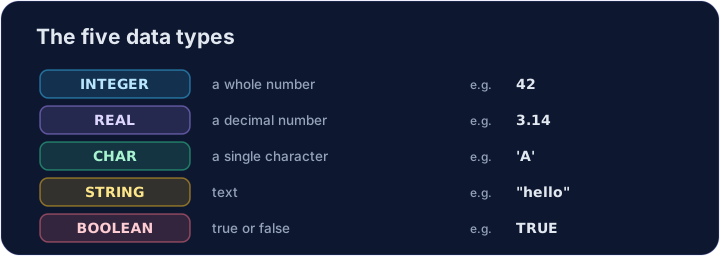
The five data types
- Every value has a type. The 2026–2028 syllabus uses five: INTEGER, REAL, CHAR, STRING and BOOLEAN.
Español
Los cinco tipos de datos
- Todo valor tiene un tipo. El plan de estudios 2026–2028 utiliza cinco: INTEGER, REAL, CHAR, STRING y BOOLEAN.
DECLARE Price : REAL
DECLARE Letter : CHAR
DECLARE Passed : BOOLEAN
Price ← 2.50
Letter ← 'A'
Passed ← TRUE
OUTPUT Price, " ", Letter, " ", Passed
English
Watch out
- Without
DECLARE ... : INTEGER,INPUTkeeps the value as a string, soAge + 1would fail. CHARholds one character in single quotes ('A');STRINGholds many in double quotes.
Español
Precaución
- Sin
DECLARE ... : INTEGER,INPUTmantiene el valor como cadena de texto, por lo queAge + 1fallaría. CHARcontiene un carácter entre comillas simples ('A');STRINGcontiene muchos entre comillas dobles.
English
Common mistakes
INPUT xreads a value intox.- Choose the right type: INTEGER, REAL, STRING, BOOLEAN or CHAR.
Español
Errores comunes
INPUT xlee un valor enx.- Elige el tipo correcto: INTEGER, REAL, STRING, BOOLEAN o CHAR.
English
Now you try
- Each task reads one input with
INPUT. - Press Check answer to test it.
Español
Ahora tú intentas
- Cada tarea lee una entrada con
INPUT. - Pulsa Check answer para probarla.
Read a name with INPUT, then output Hi, followed by the name. For input Sam, output Hi, Sam. · Leer un nombre con INPUT, luego imprimir Hi, seguido del nombre. Para la entrada Sam, imprimir Hi, Sam.
Click Run to see the output here. · Haz clic en Ejecutar para ver la salida aquí.
DECLARE N as INTEGER, read it with INPUT, then output N + 1. For input 9, output 10. · DECLARE N como INTEGER, léelo con INPUT, luego imprime N + 1. Para entrada 9, imprime 10.
Click Run to see the output here. · Haz clic en Ejecutar para ver la salida aquí.
Read an INTEGER N, then output N doubled (times 2). For input 6, output 12. · Leer un INTEGER N, luego imprimir N duplicado (por 2). Para la entrada 6, imprimir 12.
Click Run to see the output here. · Haz clic en Ejecutar para ver la salida aquí.