Inserting rows
INSERT adds a new row to a table. List the columns, then a matching set of VALUES:
INSERT INTO product (code, title, price, in_stock)
VALUES ('P04', 'Ruler', 1.20, 75);
Text goes in single quotes; numbers do not. The values must line up with the columns, in the same order.
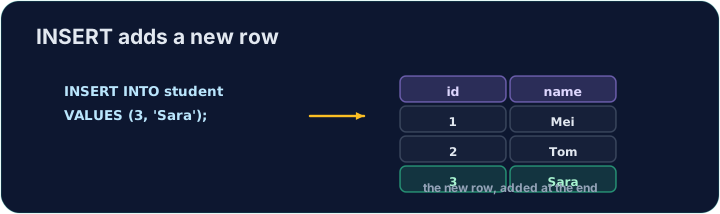
INSERT changes the data but returns no rows itself, so Run just reports how many rows changed. To see the new row, run a SELECT afterwards.
The checker does this for you: it runs your INSERT, then reads the table back to confirm your row is there.
Question. Add the product P05, an Eraser costing 0.60, with 120 in stock.
Answer. When you give a value for every column, you may leave out the column list. The values must then follow the table's own column order (code, title, price, in_stock):
INSERT INTO product VALUES ('P05', 'Eraser', 0.60, 120);
Reading the table back:
code | title    | price | in_stock
P01  | Notebook | 2.5   | 40
P02  | Pen      | 0.8   | 200
P03  | Backpack | 18    | 15
P05  | Eraser   | 0.6   | 120
Listing the columns is still the safer habit: the statement keeps working if the table gains a column.
- Wrong number of values.
INSERT INTO product VALUES ('P05', 'Eraser', 0.60)fails:table product has 4 columns but 3 values were supplied. - A primary key that is already used. Inserting a second
'P01'fails withUNIQUE constraint failed: product.code. - Text and dates go in single quotes:
'Ruler','2024-04-10'. Numbers do not.
Difficulty 2/5 · 140 coins + a small bonus on first completion today
Add a new product to the product table: code 'P04', title 'Ruler', price 1.20, in_stock 75.
Click Run to see the output here.
Difficulty 2/5 · 140 coins + a small bonus on first completion today
Add a new customer to the customer table: id 5, name 'Eve', city 'York'. List the columns you are filling, then give the matching VALUES.
Click Run to see the output here.
Difficulty 2/5 · 140 coins + a small bonus on first completion today
Ben (customer 2) places a first order. Add it to orders: id 14, customer_id 2, order_date '2024-04-10', total 7.25. The date goes in single quotes.
Click Run to see the output here.