Grouping with GROUP BY
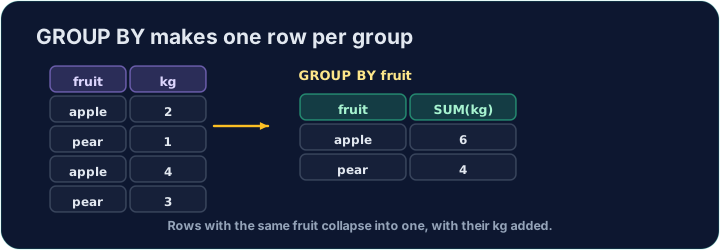
An aggregate like AVG normally summarises the whole table into one number. GROUP BY splits the rows into groups that share a value, and gives one summary row per group:
SELECT form, COUNT(*) AS n, ROUND(AVG(score), 2) AS avg_score
FROM student
GROUP BY form;
This gives one row for each form, with that form's count and average.
WHERE filters rows before grouping. To filter the groups themselves — using an aggregate — use HAVING:
SELECT form, COUNT(*) AS n
FROM student
GROUP BY form
HAVING COUNT(*) >= 3;
This keeps only forms with 3 or more students. (WHERE cannot test COUNT(*); HAVING can.)
Question. For each form, show the form and the total of the scores of the students who scored 70 or more, as total.
Answer. WHERE removes rows before they are grouped, so Tom (64) never reaches the 11B group:
SELECT form, SUM(score) AS total
FROM student
WHERE score >= 70
GROUP BY form;
form | total
11A  | 271
11B  | 72
The clauses always go in this order: SELECT … FROM … WHERE … GROUP BY … HAVING … ORDER BY ….
- Filter groups with
HAVING, rows withWHERE.HAVING COUNT(*) >= 3tests a group;WHERE score >= 70tests a row. - Clause order.
GROUP BYbeforeWHEREis a syntax error. - A plain column beside an aggregate must be in
GROUP BY. InSELECT form, name, COUNT(*) … GROUP BY form,namehas many values in each group, so the answer is meaningless. Most databases refuse the query; SQLite, which runs this playground, quietly picks one name per group, so no error does not mean it is right.
Difficulty 3/5 · 200 coins + a small bonus on first completion today
For each form, show the form, the number of students as n, and the average score (2 d.p.) as avg_score. Group by form.
Click Run to see the output here.
Difficulty 3/5 · 200 coins + a small bonus on first completion today
Show each form and its student count n, but only for forms with 3 or more students. Use HAVING.
Click Run to see the output here.
Difficulty 3/5 · 200 coins + a small bonus on first completion today
For each form, count only the students who scored 80 or more, as n. The starter counts everyone: add a WHERE. (A form with no such student drops out of the result.)
Click Run to see the output here.