Choosing columns
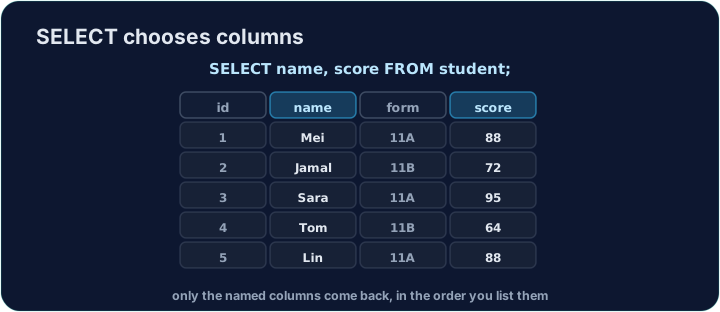
SELECT * returns every column. Usually you want only a few. Instead of *, list the columns you want, separated by commas:
SELECT name, score FROM student;
The result has just those columns, in the order you wrote them.
You can rename a column in the result with AS. This does not change the table — only the heading shown:
SELECT name AS pupil, score AS mark FROM student;
The headings become pupil and mark. This is handy for clear reports.
Question. The table student has the fields id, name, form and score. Write a query that shows each student's form, then their name.
Answer. Name the two fields in the order the question asks for:
SELECT form, name FROM student;
form | name
11A  | Mei
11B  | Jamal
11A  | Sara
11B  | Tom
11A  | Lin
Writing SELECT name, form would show the same data with the columns the other way round, and the question asked for form first.
- A missing comma renames a column.
SELECT name score FROM studentis read asname AS score: you get one column headedscorethat holds the names. Put a comma between every two columns. - No comma after the last column.
SELECT name, score, FROM studentis a syntax error. ASchanges only the heading in the result. The table itself keeps its field names.
SELECT picks columns
Choosing columns keeps only the fields you name.
Difficulty 1/5 · 100 coins + a small bonus on first completion today
Select only the name and score columns from student, in that order.
Click Run to see the output here.
Difficulty 1/5 · 100 coins + a small bonus on first completion today
Select name and score, but rename the headings to pupil and mark using AS.
Click Run to see the output here.
Difficulty 1/5 · 100 coins + a small bonus on first completion today
Show each student's score first, then their name. The starter lists the two columns the wrong way round: swap them.
Click Run to see the output here.