Reading files
This page needs a recent browser (with SharedArrayBuffer support). Please update Chrome, Edge, Firefox or Safari to the latest version.
Reading a file
catprints a file's contents straight to the screen:
cat poem.txt
- It is named after "concatenate" — it can also join several files together.
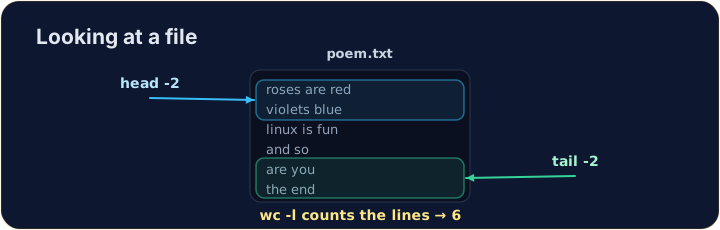
Just the start or end
- For a long file you often want only a peek:
headshows the first lines,tailshows the last lines.
head -n 2 poem.txt
tail -n 1 poem.txt
- The
-noption chooses how many lines.
Counting
wc(word count) measures a file. The most useful option is-lfor lines:
wc -l poem.txt
wc -wcounts words andwc -ccounts bytes (wc -mcounts characters; they differ only for letters such as é). Now try the tasks.
Common mistakes
catprints a whole file at once. On a real terminal,less poem.txtlets you scroll a long file; this practice terminal does not haveless.wc -lhere prints just the number. A real terminal adds the file name:4 poem.txt.- On a real terminal, Tab completes a long file name; this practice terminal has no Tab completion.
Difficulty 1/5 · 100 coins + a small bonus on first completion today
Use cat to print the whole contents of poem.txt.
Difficulty 1/5 · 100 coins + a small bonus on first completion today
How many lines does the poem have? Use wc -l poem.txt to count them.
Difficulty 1/5 · 100 coins + a small bonus on first completion today
Show only the first two lines of poem.txt. (No cat this time: print just those two lines.)
Difficulty 1/5 · 100 coins + a small bonus on first completion today
Show only the last line of poem.txt.