Aligning equations
This page needs a recent browser (with SharedArrayBuffer support). Please update Chrome, Edge, Firefox or Safari to the latest version.
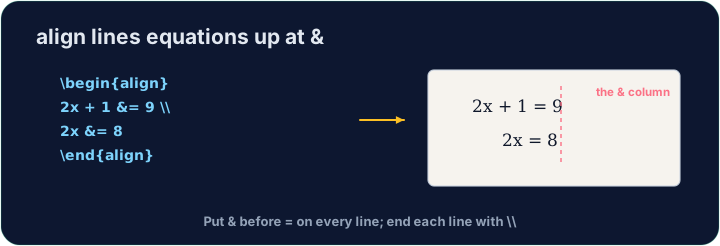
Lining equations up
- When you show working, readers like the
=signs to line up. Thealign*environment does this:
\begin{align*}
  y &= 2(x + 3) \\
  y &= 2x + 6
\end{align*}
- The
&marks where to align (just before each=), and\\ends each line.
Numbered or not
align*(with the star) gives no equation numbers.- Drop the star —
align— and LaTeX numbers each line(1),(2), … for you to refer to.
Matrices
amsmathalso gives matrices.bmatrixdraws square brackets:
\[
  \begin{bmatrix} 1 & 2 \\ 3 & 4 \end{bmatrix}
\]
- Again
&separates columns and\\separates rows — the same idea as alignment.
Common mistakes
alignwithoutamsmath. LaTeX stops with! LaTeX Error: Environment align undefined.- A blank line inside
align. It gives! Paragraph ended before \align was complete.Keep the lines together;\\already starts a new row. - The
&in different places. Put it just before the symbol to line up, usually&=, on every line.
Difficulty 2/5 · 140 coins + a small bonus on first completion today
Show the two steps lined up at the = sign. Put them in an align* environment, with & just before each = and \\ between the lines.
Click Run to compile and preview the PDF.
Difficulty 2/5 · 140 coins + a small bonus on first completion today
Draw a 2×2 matrix with bmatrix (square brackets). Separate columns with & and rows with \\, e.g. \begin{bmatrix} 1 & 2 \\ 3 & 4 \end{bmatrix}.
Click Run to compile and preview the PDF.
Difficulty 2/5 · 140 coins + a small bonus on first completion today
Solve $2x + 3 = 11$ in three lines inside align*, lined up at =: 2x + 3 &= 11, then 2x &= 8, then x &= 4. End the first two lines with \\.
Click Run to compile and preview the PDF.