Encoding is not encryption
A common mix-up
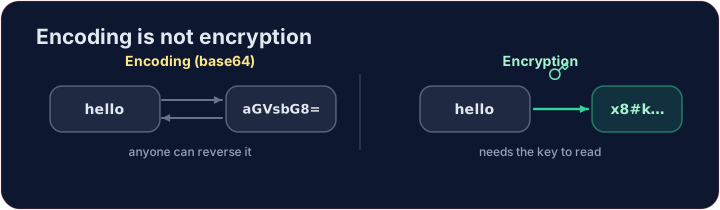
- People often say "encoded" when they mean "encrypted". They are not the same.
- Encoding changes the format of data so it can be stored or sent — it is not secret.
- Encryption changes data so that only someone with the key can read it — it is secret.
Base64 — a famous encoding
- Base64 rewrites bytes using 64 safe characters. It is used to put images or files inside text (like email).
import base64
secret = base64.b64encode(b"hello").decode()
print(secret)            # aGVsbG8=
print(base64.b64decode(secret).decode())   # back to hello
- Anyone can decode it — no key needed. So base64 hides nothing.
Why this matters for security
- If a website "protects" your password with base64, it is not protected at all.
- Real protection needs encryption (with a key) or hashing (one-way). Encoding is just a costume.
Try it
- Encode
helloto base64 below. Then imagine decoding it — and remember it is not a secret.
Covers: foundation for IGCSE 2.3 / A-Level 17.1 (encryption).
Common mistakes
- Base64 is encoding — anyone can reverse it, so it gives no security.
- Encoding changes the format; encryption protects the content.
Difficulty 2/5 · 140 coins + a small bonus on first completion today
Use base64 to encode the word hello. Encode its bytes and print the result as text. (Notice: anyone can decode it — encoding is not secret.)
Click Run to see the output here.
Difficulty 2/5 · 140 coins + a small bonus on first completion today
An app 'protected' a message as base64 — prove that protects nothing. Decode captured with base64.b64decode and print the text. No key needed.
Click Run to see the output here.
Difficulty 2/5 · 140 coins + a small bonus on first completion today
A site should store a hash of your password, never the password or its base64. Write check_login(attempt, stored), which returns True when the SHA-256 hash of attempt (as hex text) equals stored. Use hashlib.sha256(attempt.encode()).hexdigest(). (This check leaves out the salt and slow hash of lesson 07 to stay short.)
Click Run to see the output here.