Text files: write then read
Files keep data after the program ends
- A file stores data on disk, so it is still there after your program stops.
- You work with a file through a
FILE *— a pointer you get fromfopen. - In these tasks you write a file, then read it back in the same program, so everything is self-contained.
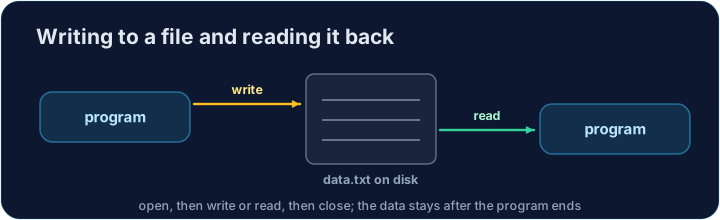
Writing then reading a file
A file is used in three steps: open it with fopen, read or write, then close it with fclose.
Opening and closing
fopen("data.txt", "w")opens a file for writing (it creates or empties the file).fopen("data.txt", "r")opens it for reading.- Always
fclose(f)when you are done, so the data is saved and the file is released.
Writing with fprintf
fprintfworks likeprintf, but its first argument is theFILE *.fprintf(f, "%d\n", x);writes the numberxand a newline into the filef.- Write each value on its own line so it is easy to read back.
Reading with fscanf and fgets
fscanf(f, "%d", &x)reads one number; it returns1when it succeeds.fgets(buf, size, f)reads one line of text intobuf; it returnsNULLat the end.- Loop until the read fails to process the whole file.
#include <stdio.h>

int main(void) {
    FILE *f = fopen("nums.txt", "w");
    fprintf(f, "3\n4\n");
    fclose(f);

    f = fopen("nums.txt", "r");
    if (f == NULL) {          // the file could not be opened
        printf("cannot open nums.txt\n");
        return 1;
    }
    int x, total = 0;
    while (fscanf(f, "%d", &x) == 1) {
        total += x;
    }
    fclose(f);

    printf("%d\n", total);   // 7
    return 0;
}
Common mistakes
- Check that
fopendid not returnNULLbefore reading or writing. - Always
fclosethe file when you are done.
Now you try
- These tasks are full programs: write inside
main, and Check answer tests the output. - Write the file first,
fcloseit, then open it again for reading and loop until the read fails.
Difficulty 3/5 · 200 coins + a small bonus on first completion today
In main: write the numbers 10, 20, 5, 7 (one per line) to a file, close it, then open it again and add them up with fscanf. Print the total (42).
Click Run to see the output here.
Difficulty 3/5 · 200 coins + a small bonus on first completion today
In main: write three lines of text to a file, close it, then open it again and count the lines with fgets. Print the count (3).
Click Run to see the output here.
Difficulty 3/5 · 200 coins + a small bonus on first completion today
Mode "w" wipes a file; mode "a" appends to the end. The starter writes 10 and 20. Reopen scores.txt with "a", add the line 30, close it, then read every number back and print the total (60).
Click Run to see the output here.