Mini-project: a profile card
This page needs a recent browser (with SharedArrayBuffer support). Please update Chrome, Edge, Firefox or Safari to the latest version. · تحتاج هذه الصفحة إلى متصفح حديث (يدعم SharedArrayBuffer). يرجى تحديث Chrome أو Edge أو Firefox أو Safari إلى أحدث إصدار.
English
Your mini-project
- Time to put it all together and build a profile card.
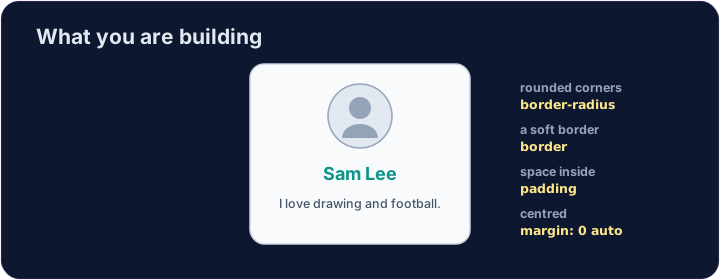
- Here is what you are aiming for:
العربية
مشروعك الصغير
- حان الوقت لجمع كل شيء وبناء بطاقة تعريف شخصية.
- إليك ما تستهدفه:
<style>
  .card { width: 280px; margin: 0 auto; padding: 20px; text-align: center;
          background-color: #f8fafc; border: 1px solid #cbd5e1; border-radius: 12px; }
  h2 { color: teal; margin: 8px 0; }
</style>
<div class="card">
  <img src="/static/code/web-basics/cat.svg" alt="My avatar" width="120">
  <h2>Sam Lee</h2>
  <p>I love drawing and football.</p>
</div>
English
What you've learned
- HTML: headings, paragraphs, lists, links, images, tables, forms, page structure.
- CSS: colours, text, the box model, spacing, sizing, and rows with Flexbox.
- That is the real foundation of every web page. You can build things now. 🎉
العربية
ما تعلمته
- HTML: العناوين، الفقرات، القوائم، الروابط، الصور، الجداول، النماذج، هيكل الصفحة.
- CSS: الألوان، النصوص، نموذج الصندوق، المسافات، الأحجام، والصفوف باستخدام Flexbox.
- هذه هي الأساس الحقيقي لكل صفحة ويب. يمكنك الآن بناء أشياء. 🎉
English
Common mistakes
- Build and check one piece at a time.
- Keep the HTML structure and the CSS styling separate.
العربية
أخطاء شائعة
- قم بالبناء والتحقق من قطعة واحدة في كل مرة.
- احتفظ بهيكل HTML وتنسيق CSS منفصلين.
English
Build your card
- The card's layout is already styled, so you can focus on filling it in.
- Each task adds one piece — content, a picture, then colour. Press ▶ often!
العربية
بنِ بطاقتك
- تم تنسيق تخطيط البطاقة بالفعل، لذا يمكنك التركيز على ملئها بالمحتوى.
- كل مهمة تضيف قطعة واحدة — محتوى، صورة، ثم لون. اضغط ▶ كثيراً!
Start your card. Inside the .card, add an <h2> with a name and a <p> with one line about you.
Add a picture above the name. Add an <img src="/static/code/web-basics/cat.svg"> with alt text, just inside the card.
Finish it with a splash of colour. Give the h2 a colour you like, e.g. h2 { color: teal; }.