Forms · تشكيلات
This page needs a recent browser (with SharedArrayBuffer support). Please update Chrome, Edge, Firefox or Safari to the latest version. · تحتاج هذه الصفحة إلى متصفح حديث (يدعم SharedArrayBuffer). يرجى تحديث Chrome أو Edge أو Firefox أو Safari إلى أحدث إصدار.
English
Forms
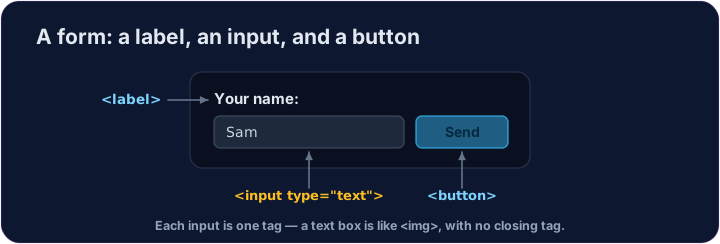
- A form lets people type things in — a name, a message, a search.
- The boxes you type in are called inputs.
- A text box is
<input type="text">— a single tag, like<img>.
العربية
النماذج
- يسمح النموذج للأشخاص بإدخال بيانات — مثل الاسم، أو الرسالة، أو البحث.
- المربعات التي تكتب فيها تسمى حقول الإدخال.
- مربع النص هو
<input type="text">— وسم واحد، مثل<img>.
English
Labels and buttons
- A
<label>is the words next to an input, telling the user what it is for. - A
<button>is something to click — like Send or Search. - We won't actually send anything here — we're just learning the tags.
العربية
التسميات والأزرار
<label>هي الكلمات المجاورة لحقل الإدخال، وتُخبر المستخدم الغرض منه.<button>هو عنصر للضغط عليه — مثل إرسال أو بحث.- لن نرسل أي شيء هنا فعليًا — نحن نتعلم فقط الوسمات.
<label>Your name:</label>
<input type="text">
<button>Send</button>
English
Common mistakes
- Every input should have a matching
<label>. - A button in a form submits it by default — use
type="button"to stop that.
العربية
أخطاء شائعة
- يجب أن يكون لكل مدخل مقابلة
<label>. - الزر في النموذج يقوم بإرساله افتراضيًا — استخدم
type="button"لمنع ذلك.
English
Now you try
- Inputs and buttons are the building blocks of every form on the web.
- Add a text box, then a button.
العربية
الآن جرب بنفسك
- حقول الإدخال والأزرار هي اللبنات الأساسية لأي نموذج على الويب.
- أضف مربع نص، ثم زرًا.
Add a box the user can type in. Use <input type="text"> (a single tag, like <img>). · أضف مربع يمكن للمستخدم الكتابة فيه. استخدم <input type="text"> (وسم واحد، مثل <img>).
Add a button that says Send. Use <button>Send</button>. · أضف زرًا يحمل كلمة إرسال. استخدم <button>Send</button>.