Getting input · الحصول على إدخال
Ask the user with input
input()waits for the user to type a line and press Enter.- It gives back what they typed. Store it in a variable.
- Join two strings together with
+.
طلب المستخدم باستخدام input
input()ينتظر المستخدم لكتابة سطر والضغط على Enter.- تُرجع ما كتبه. احفظه في متغير.
- ادمج سلسلتين نصيتين معًا باستخدام
+.
name = input()
print("Welcome, " + name)
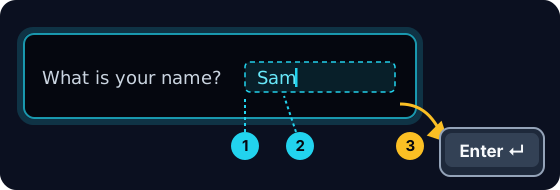
When your program waits
- When you press Run, the program stops at
input()and waits for you. - A highlighted box appears under the code: type here, then press Enter.
- Click the box, type your answer and press Enter. Then the program continues.
عندما ينتظر برنامجك
- عند الضغط على تشغيل، يتوقف البرنامج عند
input()وينتظرك. - يظهر صندوق مظلّل أسفل الكود: اكتب هنا، ثم اضغط Enter.
- انقر على الصندوق، اكتب إجابتك واضغط Enter. بعد ذلك يستمر البرنامج.
input always gives a string
- Whatever the user types comes back as a string.
- Even if they type
5, you get the text"5", not the number. - So
"5" + "5"is"55"(joined text), not10.
input تُرجع دائمًا سلسلة نصية
- whatever المستخدم يكتب يُرجع كـ سلسلة نصية.
- حتى لو كتب
5، تحصل على النص"5"، وليس الرقم. - لذا
"5" + "5"هي"55"(نص مُدمج)، وليست10.
print("5" + "5") # 55 — joined text, not the number 10
Turn text into a number
int(...)turns text into a whole number:int("5")→5.float(...)turns text into a decimal:float("2.5")→2.5.- Convert first, then you can do maths.
تحويل النص إلى رقم
int(...)يحول النص إلى عدد صحيح:int("5")→5.float(...)يحول النص إلى عدد عشري:float("2.5")→2.5.- حوّل أولاً، ثم يمكنك إجراء العمليات الحسابية.
age = int(input())
print(age + 1)
Common mistakes
input()always returns a string, so wrap it inint(...)before doing maths.- The text inside
input("...")is the prompt shown to the user.
أخطاء شائعة
input()يُرجع دائماً نصاً (string)، لذا غلّقه فيint(...)قبل إجراء العمليات الحسابية.- النص الموجود داخل
input("...")هو التوجيه المعروض للمستخدم.
Now you try
- When you Run, type the input yourself in the box and press Enter.
- Check answer types the task's input for you, so just read it with
input(). - Each task needs only one
input().
الآن جرب بنفسك
- عند التشغيل، اكتب الإدخال بنفسك في المربع واضغط إدخال.
- تحقق من الإجابة يكتب إدخال المهمة لك، لذا فقط اقرأها مع
input(). - كل مهمة تحتاج إلى
input()واحد فقط.
Input → process → output · مدخلات ← معالجة ← مخرجات
Most programs follow one shape: get input, do something, show output. · معظم البرامج تتبع شكلاً واحداً: احصل على إدخال، افعل شيئاً، اعرض إخراجاً.
Read a name with input(), then print Hi, then the name then !. For the input Sam, the output should be Hi, Sam!. · اقرأ اسماً باستخدام input()، ثم اطبع Hi, ثم الاسم ثم !. بالنسبة للإدخال Sam، يجب أن يكون الإخراج Hi, Sam!.
Click Run to see the output here. · اضغط تشغيل لرؤية المخرجات هنا.
Read a whole number with input(), convert it with int(...), then print the number plus 100. For input 7, the output should be 107. · اقرأ عدداً صحيحاً باستخدام input()، وحوله باستخدام int(...)، ثم اطبع العدد زائد 100. للإدخال 7، يجب أن تكون النتيجة 107.
Click Run to see the output here. · اضغط تشغيل لرؤية المخرجات هنا.
Read a whole number, convert it with int(...), then print its square (the number times itself). For input 5, the output should be 25. · اقرأ عدداً صحيحاً، وحوله باستخدام int(...)، ثم اطبع مربعه (العدد مضروباً في نفسه). للإدخال 5، يجب أن تكون النتيجة 25.
Click Run to see the output here. · اضغط تشغيل لرؤية المخرجات هنا.
Read the width, then the height, each with int(input()). Print the area on one line and the perimeter on the next. For the inputs 3 and 5 the output is Area: 15 and Perimeter: 16. · اقرأ العرض، ثم الطول، كل منهما باستخدام int(input()). اطبع المساحة في سطر والمحيط في السطر التالي. للإدخلات 3 و5، تكون النتيجة Area: 15 وPerimeter: 16.
Click Run to see the output here. · اضغط تشغيل لرؤية المخرجات هنا.