Tables · الجداول
This page needs a recent browser (with SharedArrayBuffer support). Please update Chrome, Edge, Firefox or Safari to the latest version. · تحتاج هذه الصفحة إلى متصفح حديث (يدعم SharedArrayBuffer). يرجى تحديث Chrome أو Edge أو Firefox أو Safari إلى أحدث إصدار.
English
Tables
- A table uses the
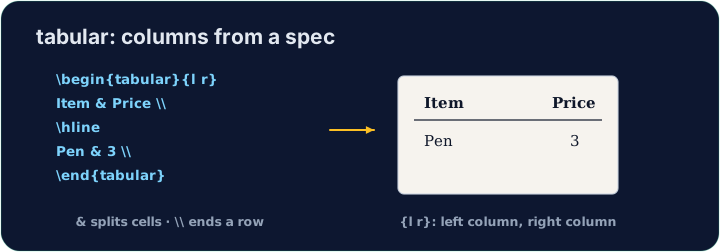
tabularenvironment. You first describe the columns:
{l c r}means three columns: left-aligned, centred, right-aligned.
العربية
الجداول
- تستخدم الجدولة بيئة
tabular. أولاً تصف الأعمدة:
\begin{tabular}{l c r}
  left & centre & right \\
\end{tabular}
- تعني
{l c r}ثلاث أعمدة: lمحاذاة يسار، cمركز، rمحاذاة يمين.
English
Rows and cells
- Inside,
&jumps to the next column and\\starts a new row:
- The number of cells in each row must match the number of columns you declared.
العربية
الصفوف والخلايا
- داخلها، يقفز
&إلى العمود التالي ويبدأ\\صف جديداً:
\begin{tabular}{l l}
  Apple & 5 \\
  Banana & 3 \\
\end{tabular}
- يجب أن يتطابق عدد الخلايا في كل صف مع عدد الأعمدة التي أعلنت عنها.
English
Lines (optional)
- Add
|between column letters for vertical lines, and\hlinefor horizontal ones:
- For a cleaner look, professionals use the
booktabspackage instead of many lines.
العربية
الخطوط (اختياري)
- أضف
|بين أحرف الأعمدة للخطوط الرأسية، وأضف\hlineللخطوط الأفقية:
\begin{tabular}{|l|l|}
  \hline
  Apple & 5 \\ \hline
\end{tabular}
- للحصول على مظهر أنظف، يستخدم المحترفون حزمة
booktabsبدلاً من العديد من الخطوط.
English
Common mistakes
tabularneeds a column spec like{lcr}; separate cells with&and end rows with\\.- The number of
&per row must fit the column spec.
العربية
أخطاء شائعة
- تحتاج
tabularمواصفة عمود مثل{lcr}؛ افصل الخلايا بـ&وانهِ الصفوف بـ\\. - يجب أن يتناسب عدد
&لكل صف مع مواصفة الأعمدة.
Build a small two-column table with \begin{tabular}{l l}. Separate the two cells in a row with &, and end each row with \\. Add the rows for Bob (30) and Mei (25). · ابنِ جدولاً صغيراً عمودين باستخدام \begin{tabular}{l l}. افصل الخليةين في الصف بـ &، وانهِ كل صف بـ \\. أضف صفوف Bob (30) و Mei (25).
Click Run to compile and preview the PDF. · اضغط تشغيل لتركيب وعرض ملف PDF.
Add lines to the table. Put \hline at the top, after the header row, and at the bottom, and use |l|l| in the column spec for vertical lines. · أضف خطوطاً للجدول. ضع \hline في الأعلى، بعد صف الرأس، وفي الأسفل، واستخدم |l|l| في مواصفات الأعمدة للخطوط العمودية.
Click Run to compile and preview the PDF. · اضغط تشغيل لتركيب وعرض ملف PDF.