Aligning equations · محاذاة المعادلات
This page needs a recent browser (with SharedArrayBuffer support). Please update Chrome, Edge, Firefox or Safari to the latest version. · تحتاج هذه الصفحة إلى متصفح حديث (يدعم SharedArrayBuffer). يرجى تحديث Chrome أو Edge أو Firefox أو Safari إلى أحدث إصدار.
English
Lining equations up
- When you show working, readers like the
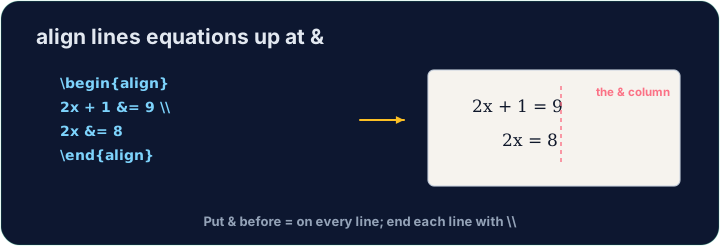
=signs to line up. Thealign*environment does this:
- The
&marks where to align (just before each=), and\\ends each line.
العربية
محاذاة المعادلات
- عند إظهار الحل، يفضل القراء أن تتطابق علامات
=. يقوم بيئةalign*بذلك:
\begin{align*}
  y &= 2(x + 3) \\
  y &= 2x + 6
\end{align*}
- تشير
&إلى أين تتم المحاذاة (مباشرة قبل كل=)، وتنتهي\\كل سطر.
English
Numbered or not
align*(with the star) gives no equation numbers.- Drop the star —
align— and LaTeX numbers each line(1),(2), … for you to refer to.
العربية
ترقيم أم لا
align*(مع النجمة) لا يعطي أرقام معادلات.- احذف النجمة —
align— ويقوم LaTeX برقم كل سطر(1)،(2)، … ليتمكنوا من الإشارتها.
English
Matrices
amsmathalso gives matrices.bmatrixdraws square brackets:
- Again
&separates columns and\\separates rows — the same idea as alignment.
العربية
المصفوفات
amsmathيوفر أيضاً مصفوفات. يرسمbmatrixأقواساً مربعة:
\[
  \begin{bmatrix} 1 & 2 \\ 3 & 4 \end{bmatrix}
\]
- مرة أخرى يفصل
&الأعمدة ويفصل\\الصفوف — نفس فكرة المحاذاة.
English
Common mistakes
- In
align, line up on&and end each line with\\. - Use
align*when you do not want equation numbers.
العربية
أخطاء شائعة
- في
align، قوّم على&وانهِ كل سطر بـ\\. - استخدم
align*عندما لا تريد أرقام معادلات.
Show the two steps lined up at the = sign. Put them in an align* environment, with & just before each = and \\ between the lines. · أظهر الخطوتين متوازيتين عند علامة =. ضعهما في بيئة align*، مع & قبل كل = و\\ بين الأسطر.
Click Run to compile and preview the PDF. · اضغط تشغيل لتركيب وعرض ملف PDF.
Draw a 2×2 matrix with bmatrix (square brackets). Separate columns with & and rows with \\, e.g. \begin{bmatrix} 1 & 2 \\ 3 & 4 \end{bmatrix}. · ارسم مصفوفة 2×2 باستخدام bmatrix (أقواس مربعة). افصل الأعمدة بـ & والصفوف بـ \\، مثلاً \begin{bmatrix} 1 & 2 \\ 3 & 4 \end{bmatrix}.
Click Run to compile and preview the PDF. · اضغط تشغيل لتركيب وعرض ملف PDF.