Array methods · دوال المصفوفة
This page needs a recent browser (with SharedArrayBuffer support). Please update Chrome, Edge, Firefox or Safari to the latest version. · تحتاج هذه الصفحة إلى متصفح حديث (يدعم SharedArrayBuffer). يرجى تحديث Chrome أو Edge أو Firefox أو Safari إلى أحدث إصدار.
English
Array methods
.map(fn)makes a new array by transforming each item..filter(fn)makes a new array of only the items wherefnreturnstrue..forEach(fn)runsfnfor each item, making no new array.
العربية
طرق المصفوفات
.map(fn)تصنع مصفوفة جديدة بتحويل كل عنصر..filter(fn)تصنع مصفوفة جديدة من العناصر فقط حيث تُرجعfntrue..forEach(fn)تشغلfnلكل عنصر دون إنشاء مصفوفة جديدة.
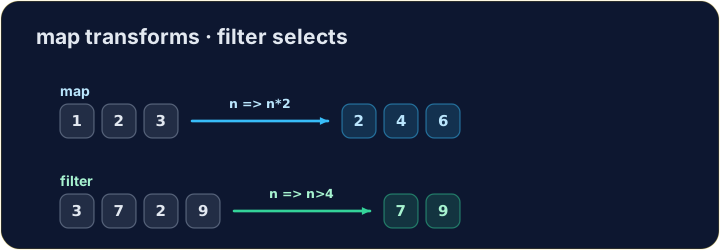
let nums = [1, 2, 3];
let doubled = nums.map((n) => n * 2);
console.log(doubled);   // → [2,4,6]
English
Filtering keeps some items
.filterkeeps each item for which the test returnstrue.
العربية
التصفية تحتفظ ببعض العناصر
.filterتحتفظ بكل عنصر يُرجع له الاختبارtrue.
let nums = [3, 7, 2, 9];
let big = nums.filter((n) => n > 4);
console.log(big);   // → [7,9]
English
Watch out
.mapand.filterreturn a new array — the original is untouched.- You hand each one an arrow function that says what to do with one item.
العربية
انتبه
.mapو.filterتُرجعان مصفوفة جديدة — الأصلية غير متغيرة.- تقدم لكل واحدة دالة سهم تحدد ما يجب فعله بعنصر واحد.
English
Common mistakes
mapandfilterreturn a NEW array — they do not change the original.forEachjust loops and returns nothing.
العربية
أخطاء شائعة
mapوfilterتُرجعان مصفوفة جَدِيدَة — لا تغيران الأصلية.forEachتمرر فقط وتُرجع شيئاً.
English
Now you try
- Use
.map,.filteror.forEach. - Press Check answer to test it.
العربية
الآن جرب بنفسك
- استخدم
.map،.filterأو.forEach. - اضغط على تحقق من الإجابة لاختبارها.
Use .map to double every number in [1, 2, 3] and store the new array in result (it should be [2, 4, 6]). · استخدم .map لمضاعفة كل رقم في [1, 2, 3] واحفظ المصفوفة الجديدة في result (يجب أن تكون [2, 4, 6]).
Click Run to see the output here. · اضغط تشغيل لرؤية المخرجات هنا.
Use .filter to keep only the numbers greater than 4 from [3, 7, 2, 9, 1], in a variable big (it should be [7, 9]). · استخدم .filter للاحتفاظ بالأرقام فقط الأكبر من 4 من [3, 7, 2, 9, 1]، في متغير big (يجب أن يكون [7, 9]).
Click Run to see the output here. · اضغط تشغيل لرؤية المخرجات هنا.
Use .forEach to add every number in [4, 8, 15] to total (it should end up 27). · استخدم .forEach لإضافة كل رقم في [4, 8, 15] إلى total (يجب أن ينتهي بـ 27).
Click Run to see the output here. · اضغط تشغيل لرؤية المخرجات هنا.